agenticos
Sovereign Agentic AI Layer · Apache-2.0 · self-hosted · built on Pydantic AI

AI agents your whole team
can use and improve.

Your team and its agents in one live chat. Build and publish agents in the browser, hand code to Claude Code or Codex, and manage access, cost and results in one place.
Open source, Apache-2.0 On infrastructure you control Models you choose
github.com/vstorm-co/agenticos→nextOall slidesFfull screen
The problem

Agents in five places.
Four questions nobody can answer.

One agent in a vendor's copilot, one in a notebook the data team wrote, one inside a SaaS product you already pay for. Then somebody asks:

What do we run?

No single list of agents, owners or versions.

What did it cost?

Every team with its own key and its own bill.

What did it touch?

Files, tools and systems, with no shared record.

Who said it could?

An approval in a chat thread, if anywhere.

The idea

The person who knows what the agent should say is not the person with commit access.

Most agent frameworks give you a library, so every change to an agent's behaviour is a pull request, a review and a release. AgenticOS gives that person a browser, a draft and a published version instead.

How it is built

Code defines, configuration composes

Code defines

Engineers, in typed Python

  • A capability is registered once: typed, tested, reviewed
  • Tools reach a model only through the capability registry
  • Sync connectors and MCP catalogue entries are added the same way

Configuration composes

Domain experts, in the browser

  • Instructions, model, tools and budget, set per agent
  • Every publish is a version; colleagues use the published one
  • Export the spec as YAML into your own repository
Configuration can only reach what code registered, so the builder cannot grant a tool that does not exist.
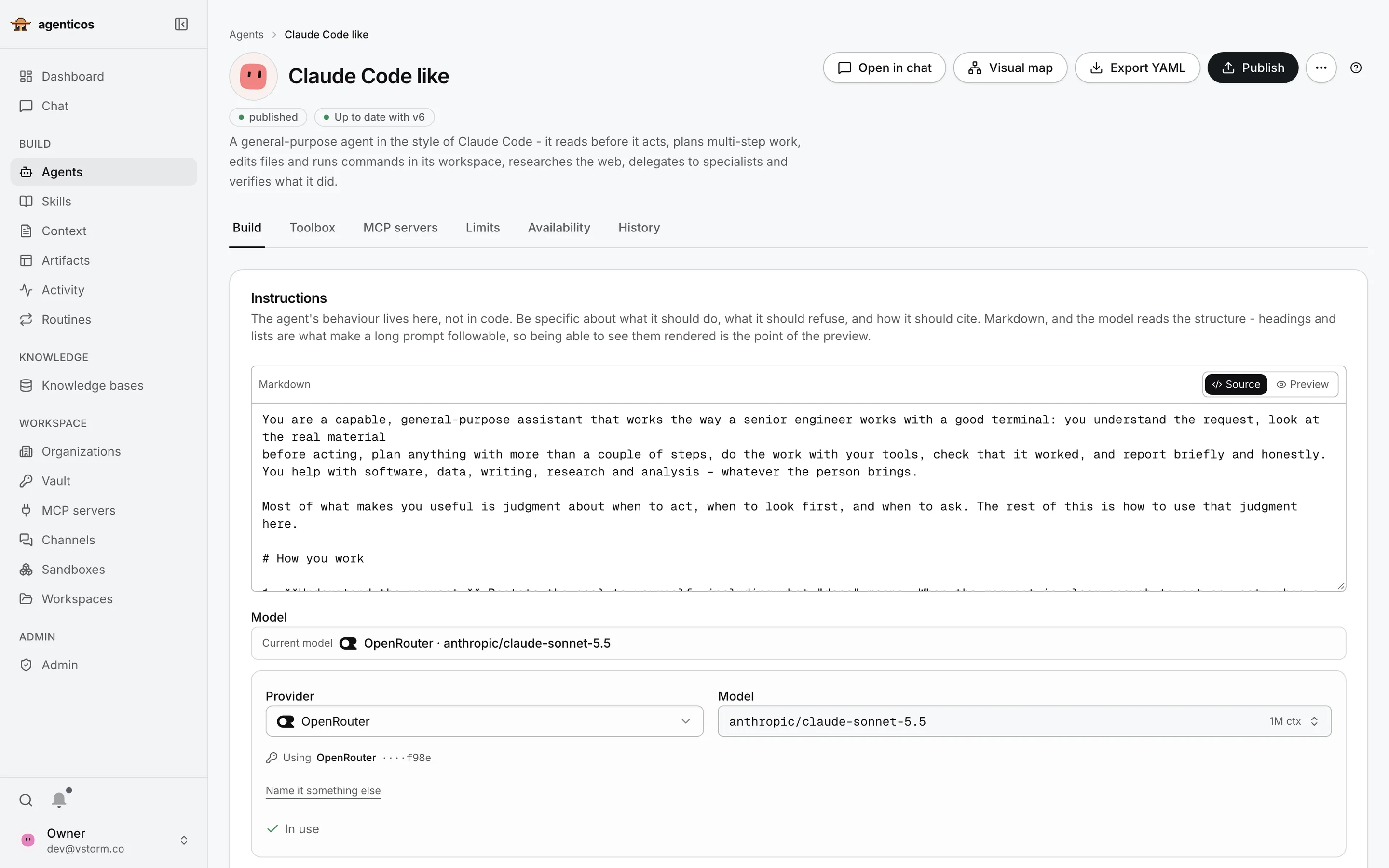
Agent builder for the Finance Analyst agent: published v3, its tabs, instructions and model.
One agent

Where an agent is made

One page per agent, in the browser. Four areas:

1Versions

What runs, and what you are editing

“Published, up to date with v3” is the version colleagues use. You edit a draft; nobody sees it until you press Publish. Export YAML keeps a copy in your own repository.

2Tools

Everything the agent may use

  • Toolbox: registered capabilities, e.g. search documents, run code
  • MCP servers: external tools such as Notion or GitHub
  • Limits: its own monthly budget
  • History: every published version
3Instructions

A brief, not code

What the agent is for, how it should work and what it must refuse, written like a brief for a new colleague. The person who knows the work can edit it.

4Model

Choose the model per agent

A provider and a model, with your own keys from the vault. Local models work the same way. Changing it is a setting, not a rebuild.
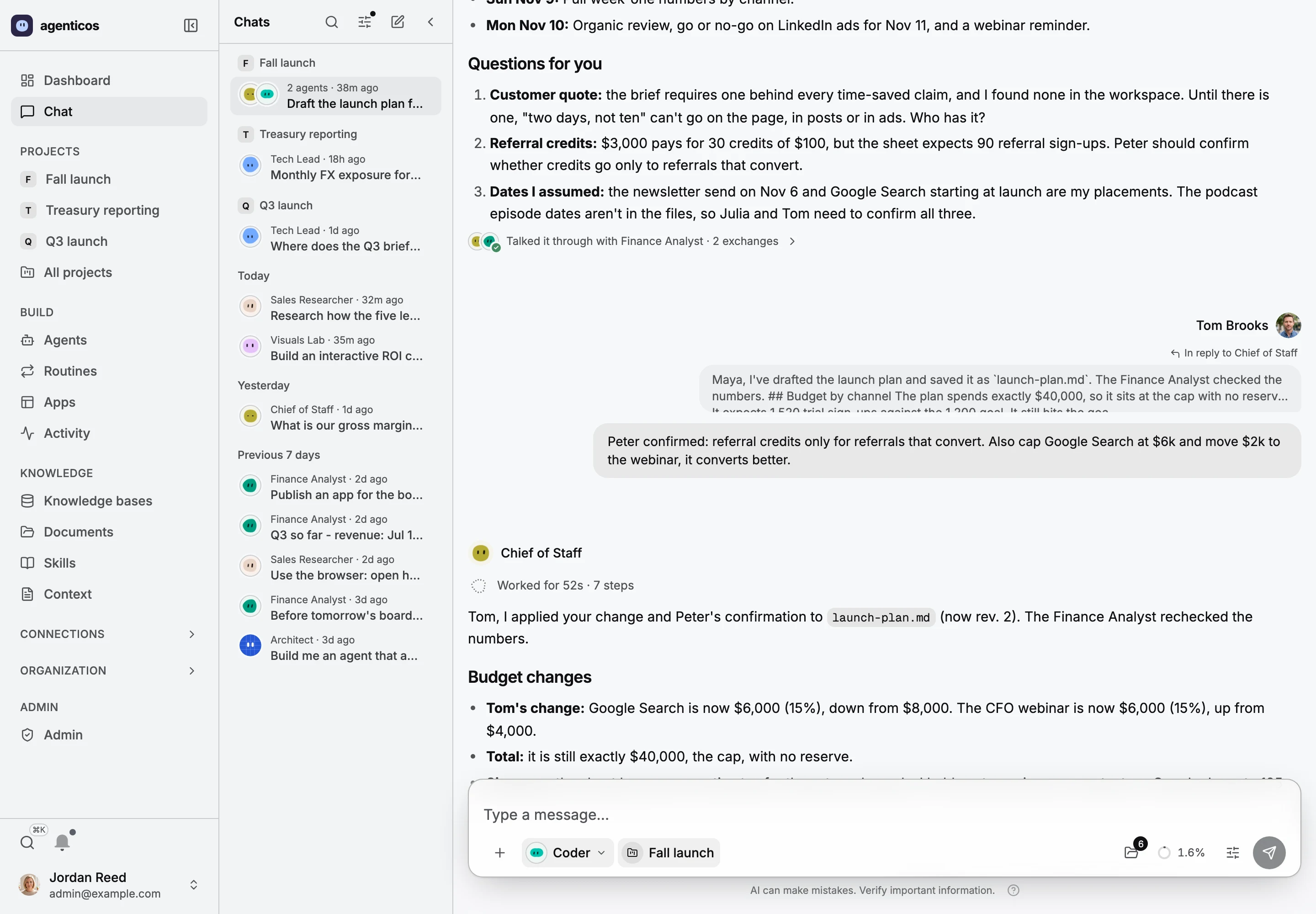
A project chat for the Fall launch: the Chief of Staff's plan with questions for the team, Tom Brooks replying with a budget change, and the agent applying it.
New · Projects

Your team and its agents, in one room

A project gives everyone the same files, instructions and a computer for the agents. Colleagues see who is here and watch each other's turns as they are written. 1 the plan, 2 a teammate's reply, 3 the agent applying it.

  1. The plan, with what the agent could not decide
  2. A teammate's reply to it
  3. The agent applying it, and saying whose change it was
1Questions for the room

It asks the people who know

The Chief of Staff drafted the launch plan from the project's brief and channel sheet, then named what only the team can answer: a customer quote, the referral rule, the dates it assumed.

2A reply

Anyone can answer, in the thread

Tom replies to the plan itself. The model is told who wrote what, so a change has an owner.

3Applied

“Tom, I applied your change”

The agent updates the plan in the project's files, asks the Finance Analyst to recheck the numbers, and keeps the budget at the cap.
Demo organization, synthetic data, real runs
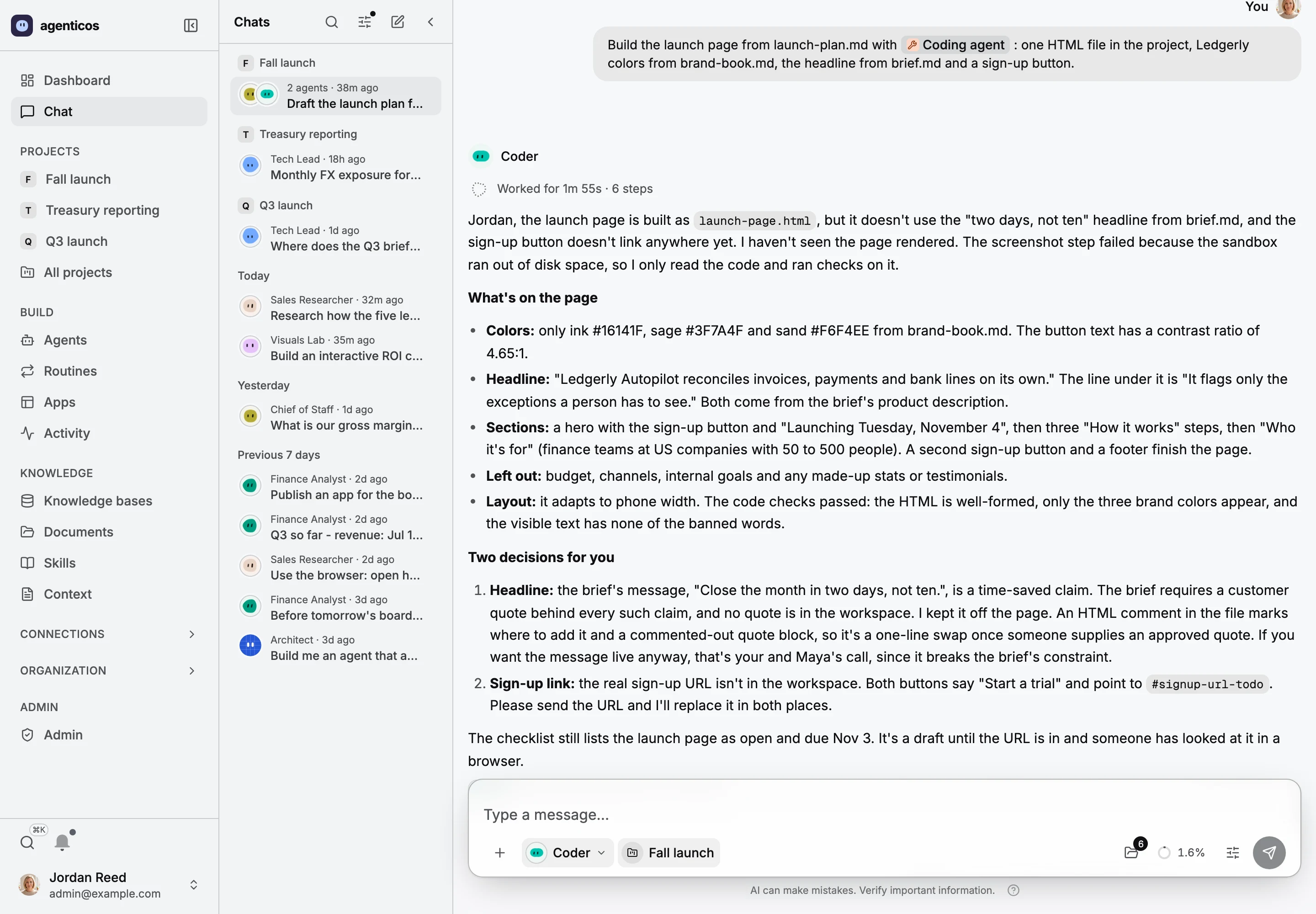
In the same project chat, Jordan Reed asks the Coder agent to build the launch page with the coding agent; Codex builds it and the agent reports what is on the page and two decisions for the team.
New · Coding agent

Claude Code and Codex, on the team

Any agent can hand software work to Claude Code or Codex. They build on the agent's own computer, on the ChatGPT or Claude plan you already pay for.

1The ask

One @ brings the coding agent in

Jordan asks for a launch page from the plan the room just agreed. The project's files are already there.

2What it built

What changed, and what it checked

Colours from the brand book, the headline from the brief, a layout for phones, and the checks it ran.

3Back to the team

It leaves people's decisions to people

The brief forbids an unsourced time-saved claim, so it kept it off the page and asked. The sign-up link is a placeholder until someone sends it.
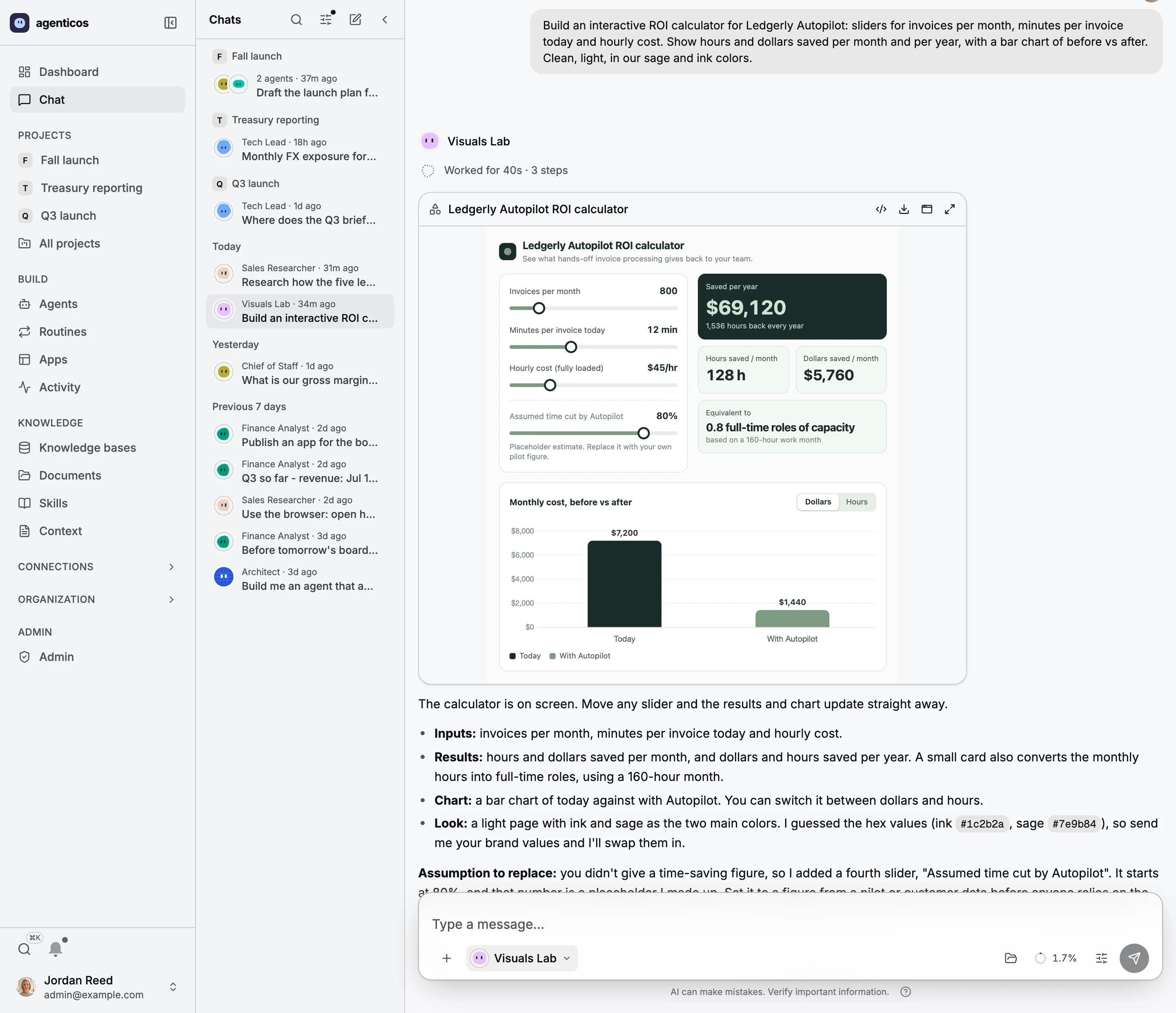
An ROI calculator the Visuals Lab agent drew under its message: sliders, the dollars saved per year and a chart of monthly cost before and after.
New · Visuals

Ask how it works, get a drawing you can use

A diagram, a calculator with sliders, a chart or a 3D scene, drawn live under the message and walled off from your data.

1The drawing

It works, right in the chat

Move a slider and the savings and the chart update. If your browser breaks it, the agent is told and fixes it in the same turn. One click saves it as an app.

2The answer

It says what it assumed

The 80% time saving is a placeholder it added, and it says so, with how to replace it.
Demo organization, synthetic data, real run
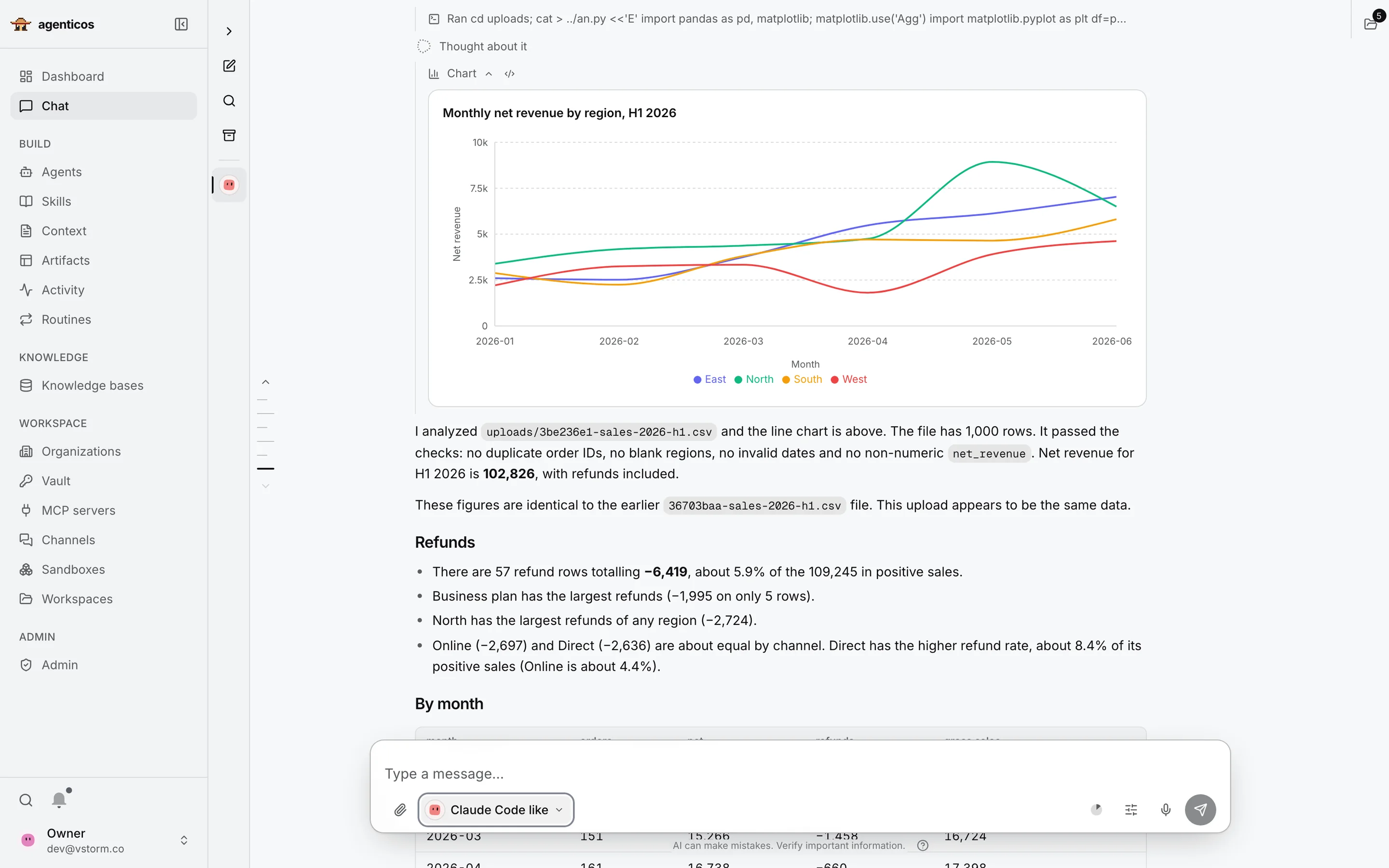
Chat with the Finance Analyst: its plan ticked off, a revenue dashboard published as an app from an attached CSV, and its answer.
Files and code · demo data

A CSV in, a dashboard out

A revenue CSV was attached with one request: a dashboard for the leadership team.

  1. The steps the agent planned and ticked off
  2. The app it published
  3. The answer, with what it checked
  4. The message box, with the agent picker
1The steps

Every step, above the answer

The agent writes a plan and ticks it off as it works. Open a step to see exactly what it did.

2The app

A page, not a paragraph

The numbers come from Python it ran on your file. The dashboard is published as an app: private, with a stable link and versions.

3The answer

It says what it estimated

The headline numbers, the definition it chose where the glossary had none, and what the file could not tell it.
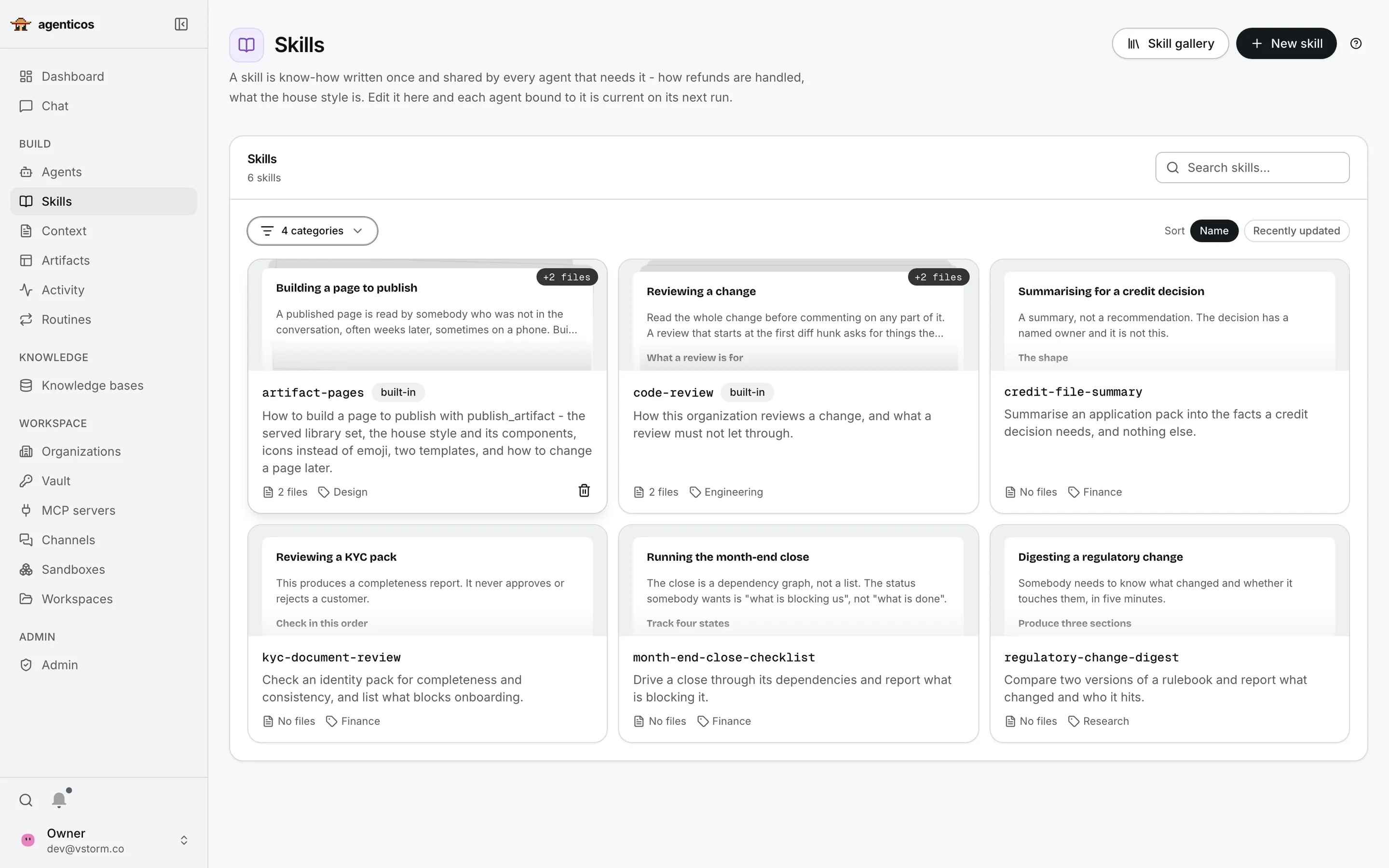
Skills library: each skill with its category, its audience and the agents that use it.
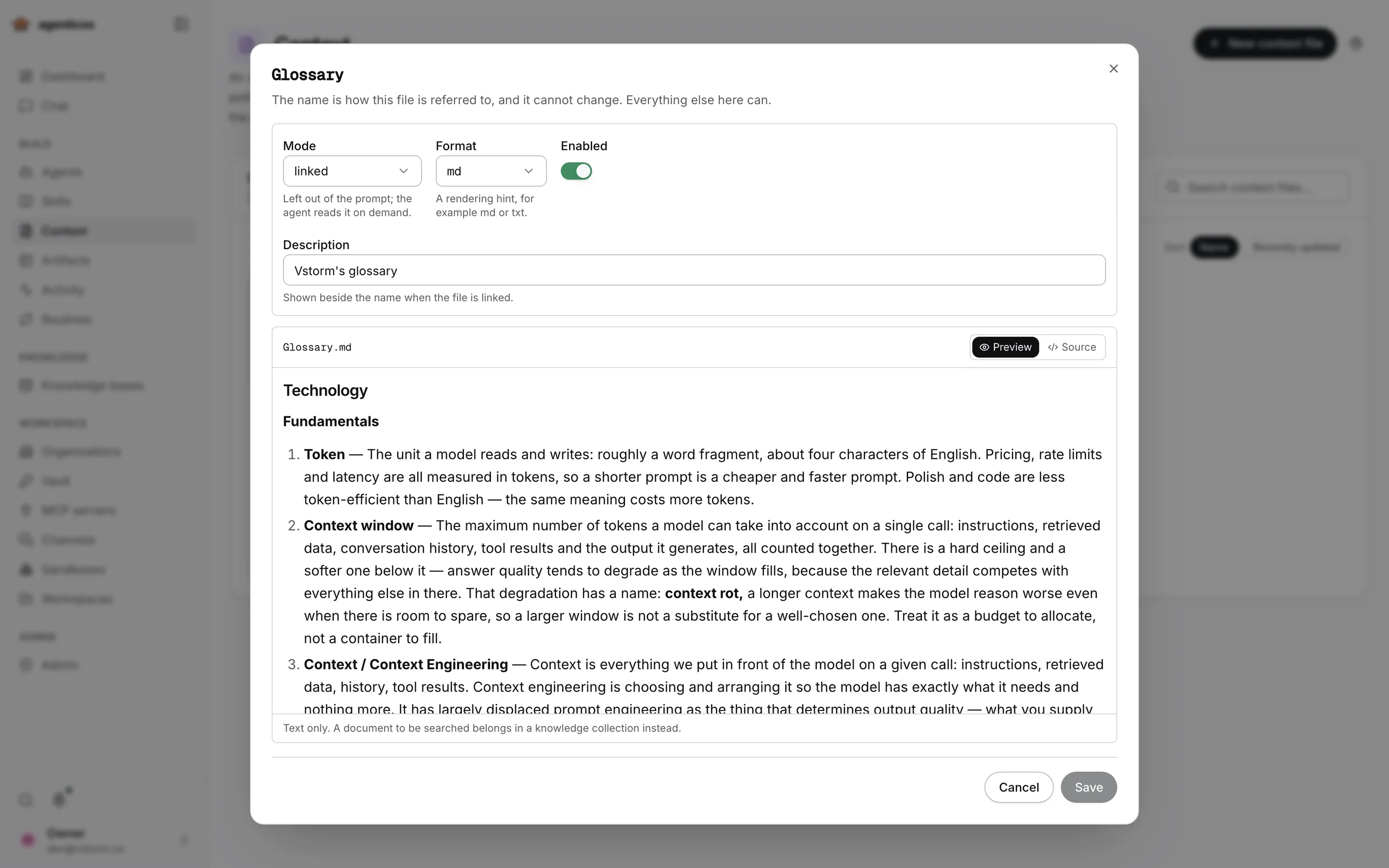
The Glossary context file, linked for on-demand reading, open in the editor.
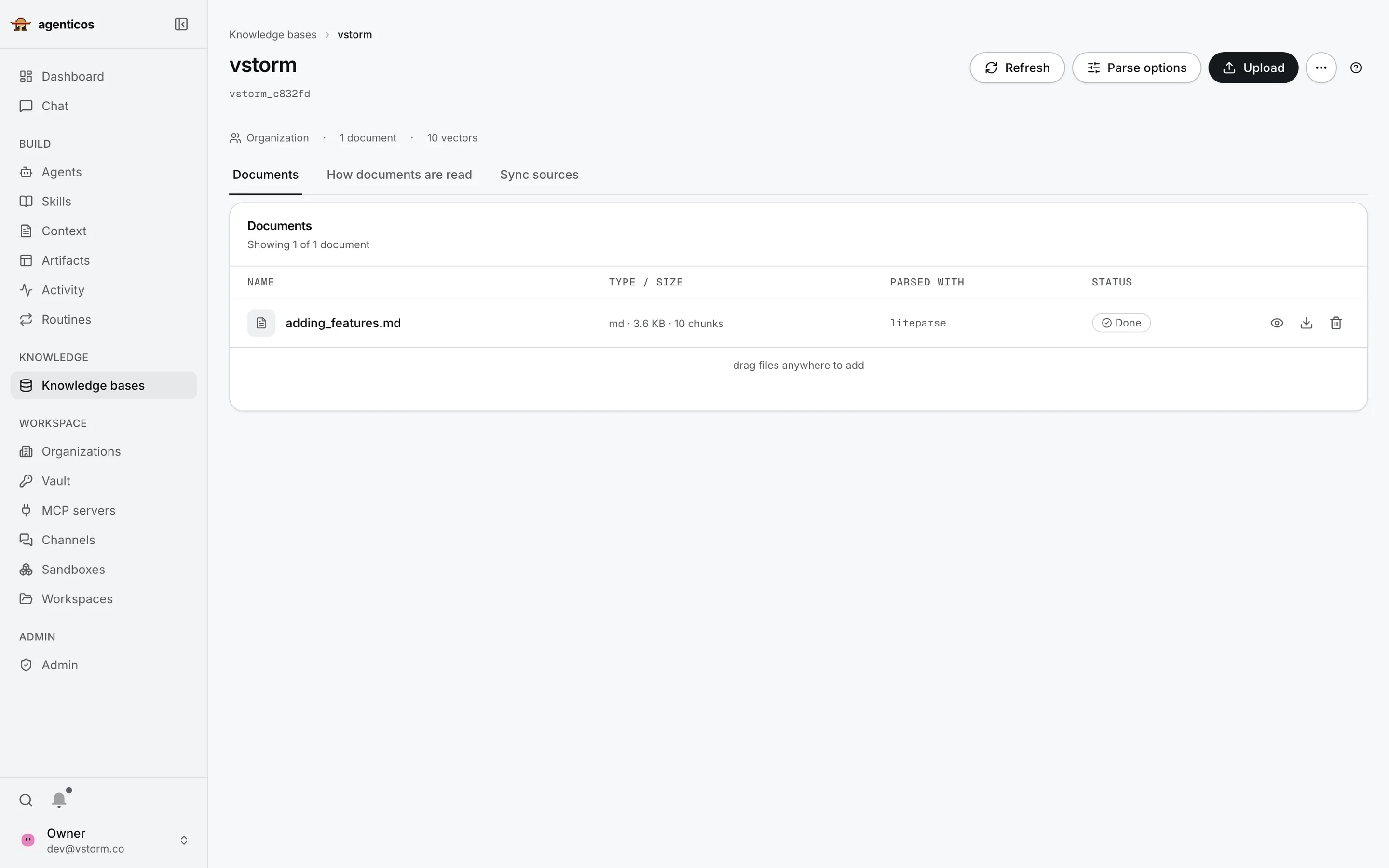
The Support handbook knowledge base: four indexed documents, how each was read and its status.
A recorded run: who approves the largest refund, two knowledge base searches and an answer citing the handbook as [1].
Skills

How your team does the work

A procedure written once, such as a code review or a month-end report. Every agent bound to it uses the current version.

Context

Standing knowledge

A glossary, a policy or a house style that every agent can share.

  1. How it is used: always in the prompt, or read on demand
  2. The content: plain text
Knowledge bases

Your documents, searchable

Upload or sync documents; the agent searches them and answers from the passages it finds (RAG).

  1. The base: what it holds and who may use it
  2. Each document, how it was read and its status
A cited answer

The passage, and where it came from

Two search_documents calls, then an answer that marks each claim with its source, [1]. The run keeps the question, the tool calls and the cost.
Demo organization, synthetic data
Publish once

Eight places one agent can answer

Web chat

In AgenticOS, for your members.

Website widget

A snippet on your site. Allowed sites only; public or signed visitors.

Hosted page

A link you can send, with its own budget, rate limit and pause switch.

API

Your systems send a task and get the answer.

WebSocket

Streamed answers, token by token, for your own front end.

Slack

Mention the bot in a channel or a thread.

Mattermost

For companies that keep chat on their own servers.

Telegram

A bot people can message directly.

One runner behind all eight, so the same budget, approvals and run record apply everywhere.
What it refuses

Much of the value is in what it refuses

refusedAnother organisation's key.A stored credential is sealed to the organisation that stored it, so a bug in an unrelated code path still cannot decrypt yours.
refusedA secret in an API response or an audit entry.Credentials are masked wherever they could be printed; a hint shows the last four characters, and logs redact tokens.
refusedThe model request that would breach the budget.Checked before the call, not tallied on the invoice. A run that fails still records what it spent.
Activity run history with one run open: tokens, cost, duration, its turns and the tool calls it made.
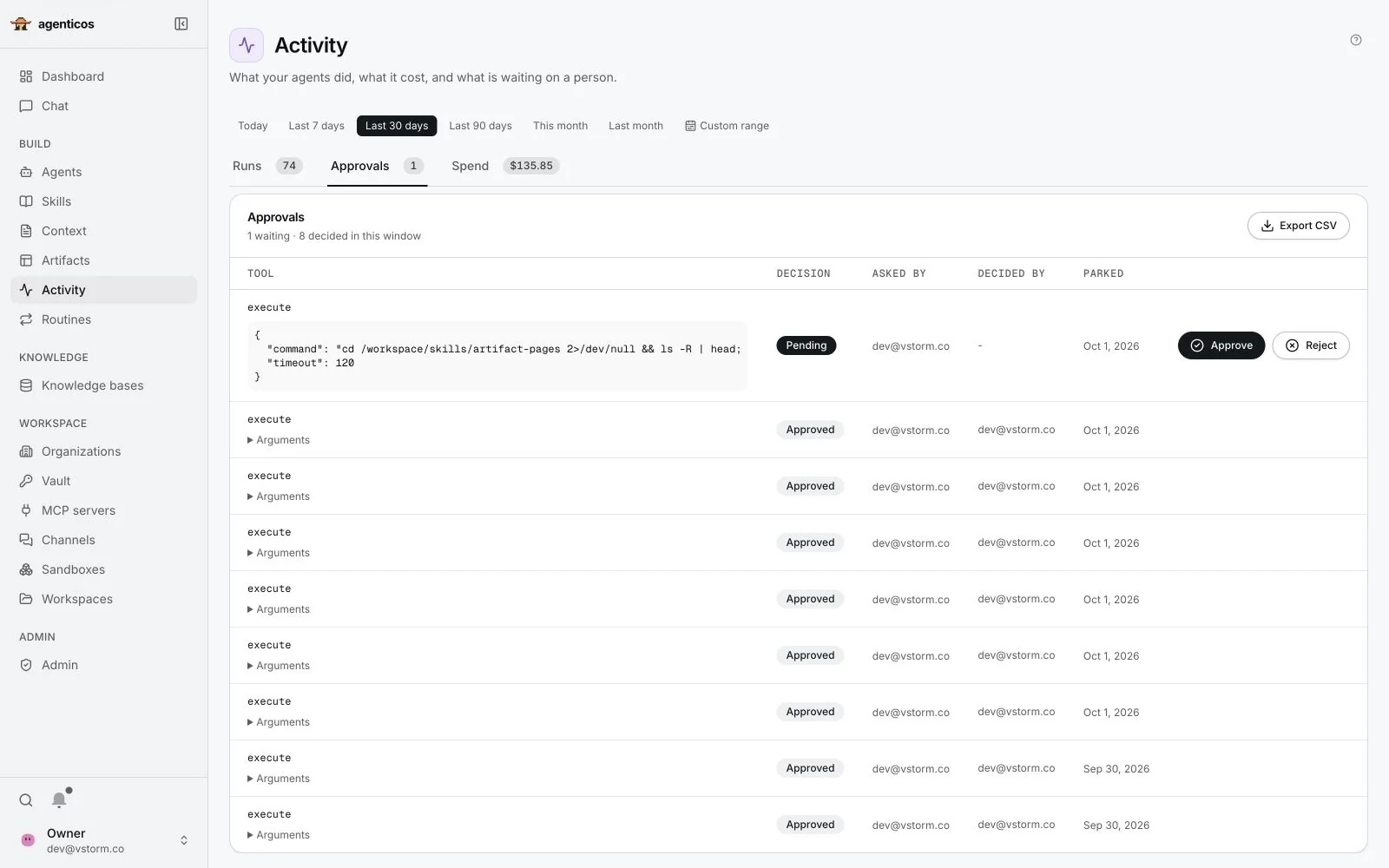
Approvals waiting on a person: an email to send, a CRM deal to update and an invoice to create, each with Approve and Reject.
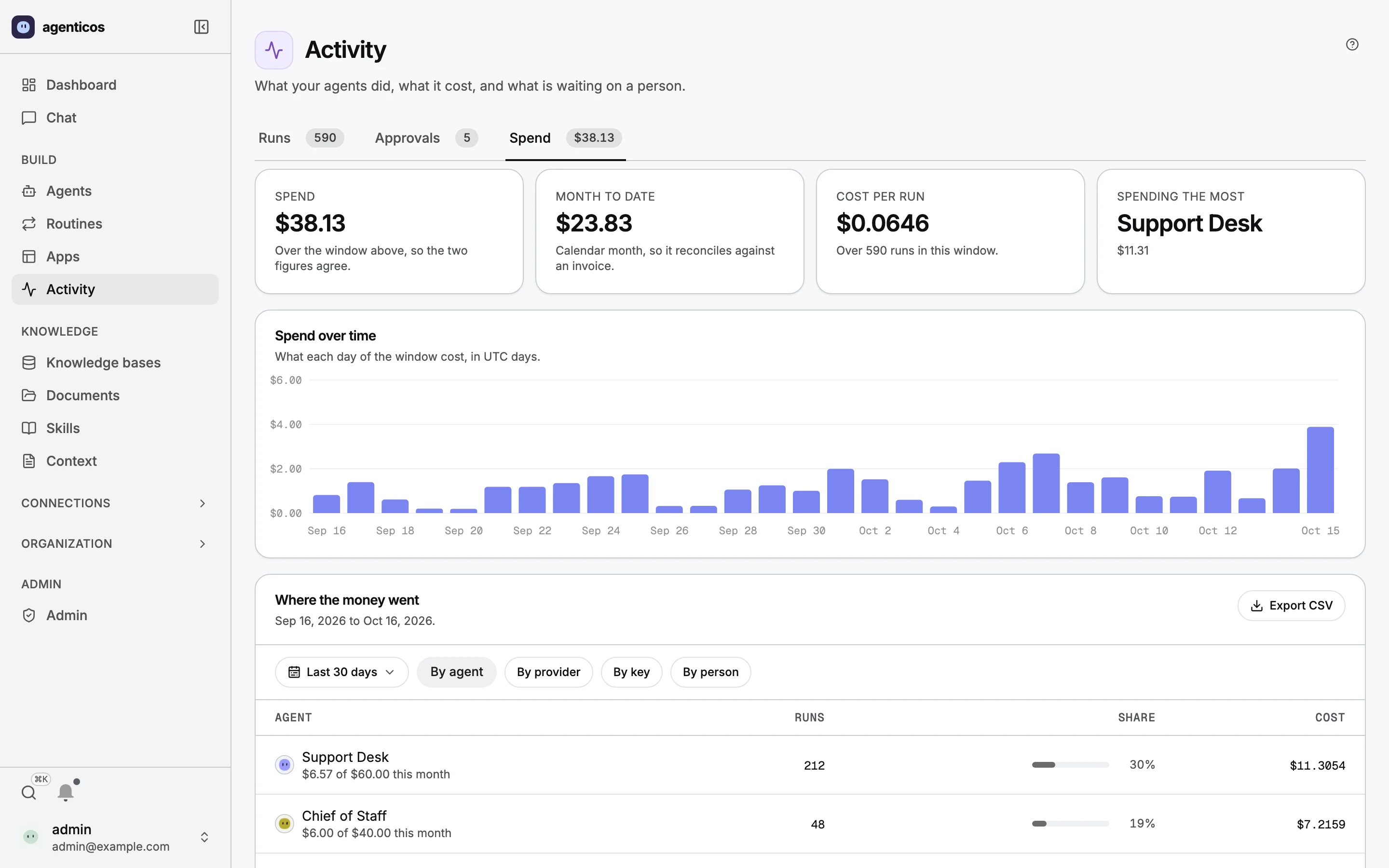
Spend: totals for the period and, per agent, what it spent against its own monthly budget.
Control

Three checks behind every run

  1. A budget, checked before every model request
  2. An approval: sensitive tools wait for a person
  3. A record of every run, and a hash-chained audit log
Demo organization, synthetic data
1Against a budget

A budget stops a run before it overspends

Monthly caps per agent and organisation, checked before each request to the model, not added up at the end of the month.

2Waiting for a person

The exact action, then a decision

You choose which tools must ask first. The agent pauses; the approver reads precisely what it wants to do and presses Approve or Reject.

3On the record

What it did and what it cost

Every run keeps its agent version, tokens, cost, tool calls and what went into the prompt. Approvals, sharing and secret changes also join a hash-chained audit log per organisation.

Sovereignty

Your Postgres. Your Docker. Your network.

Self-hosted, hosted models

  • AgenticOS, documents, vectors and logs on your servers
  • Models from a provider, under your own contract and keys
  • Switch the model per agent

Fully local

  • The same layer on your hardware
  • Open models through Ollama or vLLM
  • Local parsers and tools keep data flows inside
Self-hosting the console does not make every model, parser or tool local: review each destination you configure.
Under the hood

Built on Pydantic AI, measured under load

What runs where

Agent runtime
Pydantic AI and pydantic-ai-harness, one runner behind every surface
API
FastAPI
Console
Next.js
Background
A job queue in PostgreSQL
Data
PostgreSQL with pgvector
Code
Containers started by sandboxd
Load test · 4,740 requests
1,537 13
failed requests, before and after raising the pool

The database connection pool, not CPU, was the limit. Raising it from 5 + 10 to 20 + 30 connections removed every pool timeout.

16 September 2026 · one laptop, one API worker, stub model · docs/load-testing.md
Where it stops today

What it does not do yet

Source permissionsSharePoint ACLs are not mirrored per user. Scope the credential, share the collection.
Microsoft 365 triggersNo built-in Outlook trigger. Outlook connects through a third-party MCP service.
Visual workflow builderIn development. A plan, not a feature you can use today.
MFA, SAML, SCIMMulti-factor through your identity provider; SAML only via a bridge such as Keycloak; no SCIM.
Search quality toolsVector search with options; no reranker yet.
Scale-outSingle host with Docker Compose; no Kubernetes manifests.
Budgets under loadParallel runs can overshoot a cap slightly; a single queue makes it strict.
ResultsDepend on the model, tools and instructions, so evaluate them on your own task.
github.com/vstorm-co/agenticosMaintained by · deployment help: vstorm.co