AgenticOS · introduction

AI agents your whole team
can use and improve

An open-source workspace for building, sharing and running AI agents on infrastructure you control.

Open source, Apache-2.0 Runs where you decide Models you choose
→nextOall slidesFfull screen
Today

Five stops, from what it is to how we start

01
What it is
In one sentence, and what your teams do with it
02
See it work
The product screen by screen, its toolbox and a recording
03
Under control
Cost, actions, access, sign-in and security
04
For your technical team
Architecture, models, RAG, sizing, operations, limits
05
How we start
First tasks, who runs what, and the first step
01
Chapter 01 of 05
01
What it is
In one sentence, and what your teams do with it
02
See it work
The product screen by screen, its toolbox and a recording
03
Under control
Cost, actions, access, sign-in and security
04
For your technical team
Architecture, models, RAG, sizing, operations, limits
05
How we start
First tasks, who runs what, and the first step
What we usually hear

From chat to agents that do the work

Chat assistants

You ask, it answers. Most teams already use one, often several.

Agents that act

They use tools, read your files and run on a schedule.

Workflows across systems

Several steps and systems in one process.

IT and securityWho may use which data? FinanceWhat does it cost? Team leadWho approved that action? Where is your company on this?
AgenticOS in one sentence

One place to build AI agents, connect them to your knowledge, and keep them under control.

Build

Agents set up in the browser: instructions, model, tools. Published as versions.

Connect

Your documents, company context and the tools your teams already use.

Control

Budgets, approvals, roles and a record of every run.

What your teams do with it

Six things, one workspace

Work with files and code

Analyse spreadsheets, produce charts and documents.

Build reusable agents

Choose models and tools, publish versions, share them.

Connect company knowledge

Skills, context and searchable documents.

Share the results

Interactive pages with stable links and versions.

Run and monitor

Dashboards, run history, schedules and budgets.

Organise access

Roles, department groups and company sign-in.

Eight words you will hear today

A short glossary

Agent

An AI assistant with instructions, a model and tools, set up for one kind of work.

Skill

A written procedure an agent follows, like onboarding notes for a new colleague.

Context

Standing company knowledge: glossary, policies, house style.

Knowledge base

Your documents, made searchable so the agent answers from them (RAG).

Artifact

A page an agent publishes: a report or a dashboard with its own link.

MCP

An open standard for connecting agents to other tools, such as Notion or GitHub.

Sandbox

An isolated container where an agent may run code without touching anything else.

Routine

An agent that starts by itself: on a schedule or when something happens.

02
Chapter 02 of 05
01
What it is
In one sentence, and what your teams do with it
02
See it work
The product screen by screen, its toolbox and a recording
03
Under control
Cost, actions, access, sign-in and security
04
For your technical team
Architecture, models, RAG, sizing, operations, limits
05
How we start
First tasks, who runs what, and the first step
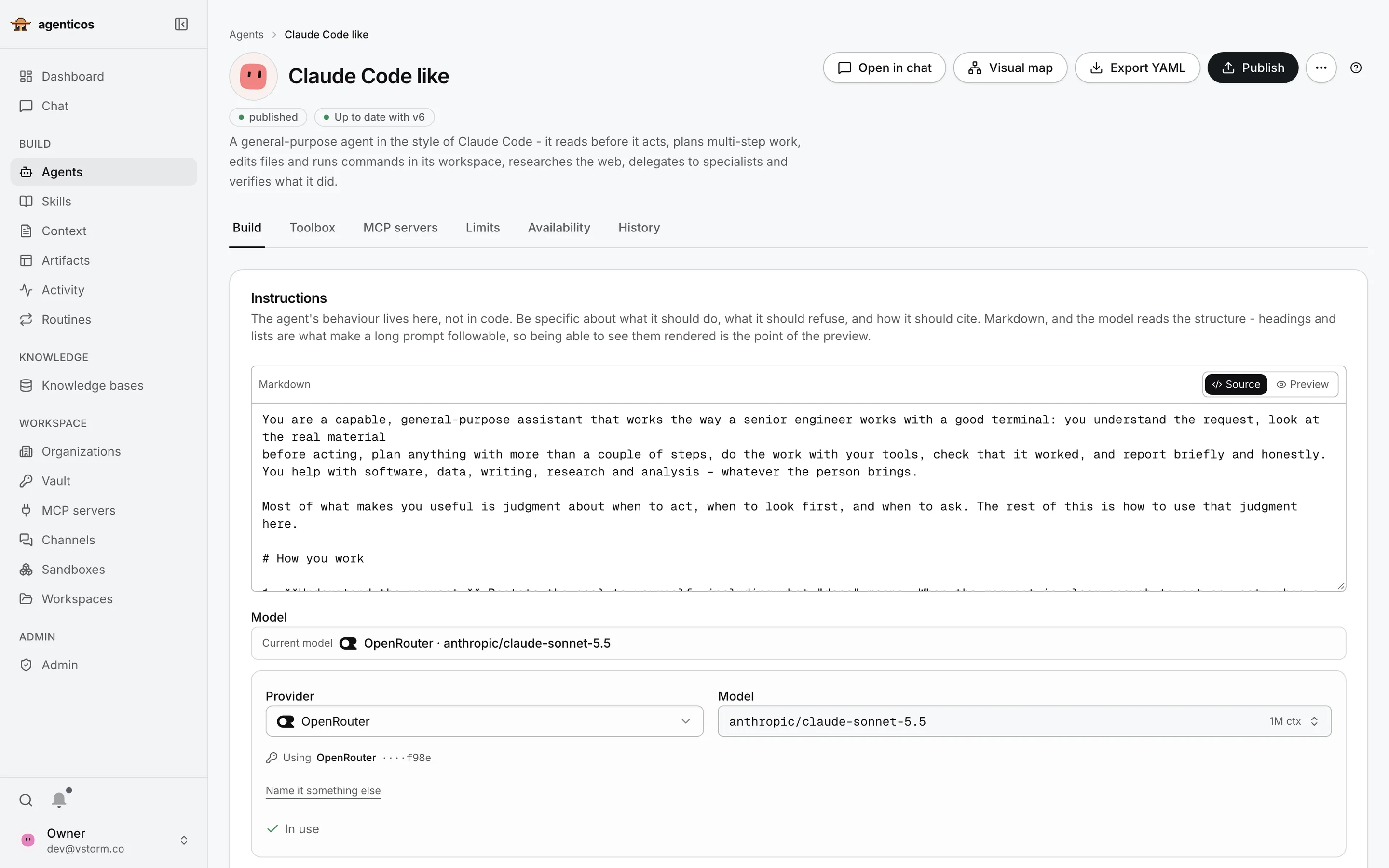
Agent builder for the Claude Code like agent: published v6, tabs, instructions and model selection.
Agent builder

Where an agent is made

One page per agent, in the browser. Four areas:

  1. Name and status: what is published, and the Publish button
  2. Tabs: tools, limits, availability, history
  3. Instructions: what the agent does, in plain language
  4. Model: which AI model answers
1Name and status

What runs, and what you are editing

“Published, up to date with v6” is the version colleagues use. You edit a draft; nobody sees it until you press Publish. Export YAML keeps a copy in your own repository.

2Tabs

Everything the agent may use

  • Toolbox: built-in abilities, e.g. search documents, run code
  • MCP servers: external tools such as Notion or GitHub
  • Limits: its own monthly budget
  • Availability: who can use it, and where
  • History: every published version
3Instructions

A brief, not code

What the agent is for, how it should work and what it must refuse. Written like a brief for a new colleague. Your experts can edit it.

4Model

Choose the model per agent

A provider and a model, with your own keys from the vault. Local models work the same way. Changing it is a setting, not a rebuild.
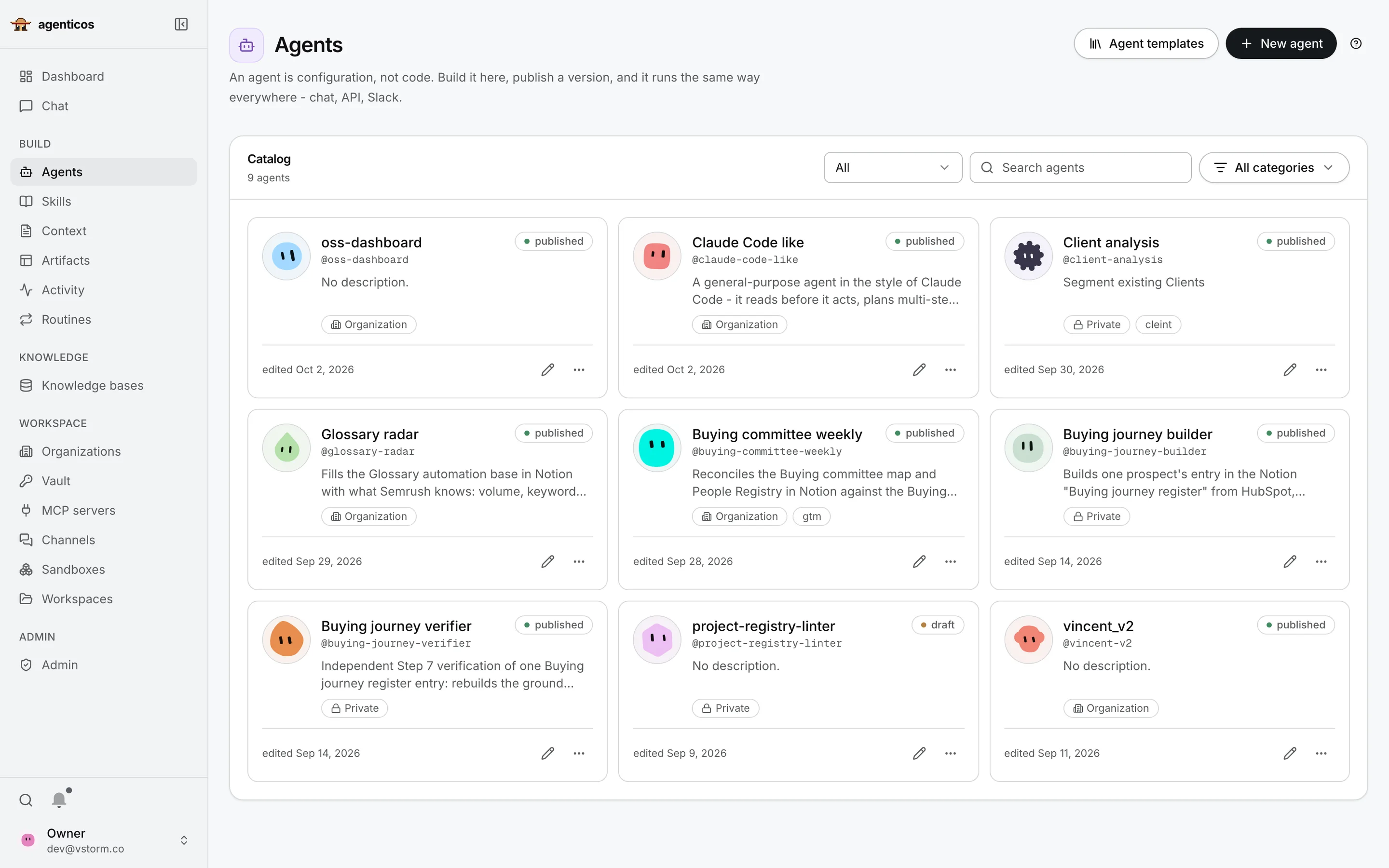
Agent catalog with nine agents, their descriptions, visibility and published state.
Agent catalog

All your agents in one place

Specialised agents for research, reporting, coding or operations.

  1. New agent: from scratch or from a template
  2. Search and filter by name or category
  3. An agent card: what it does and who can see it
1Start

Start from a template

Ready-made starting points, or an empty agent you shape yourself.

3Agent card

Who can see it, and is it live

Organization means everyone in the company may use it; Private means only its owner. Published means colleagues get the released version.
The Toolbox

26 built-in capabilities, switched on per agent

Knowledge and memory

Knowledge searchSkillsContextMemory filesMemory (mem0) Conversation search

Web

Web search Web fetchBrowser automation Browser-use, not installable yet

Files, code and output

Run PythonFiles and shell ChartsImage generation Artifacts

How it works

DelegationPlanningThinkingTool searchDate and timeSystem reminders

Safety and limits

GuardrailsContext managementMedia offloadTool output limits

Chat channels

Channel lookup
Plus any MCP tool, and capabilities your engineers add in Python.
needs a provider key   needs a sandbox   extra install
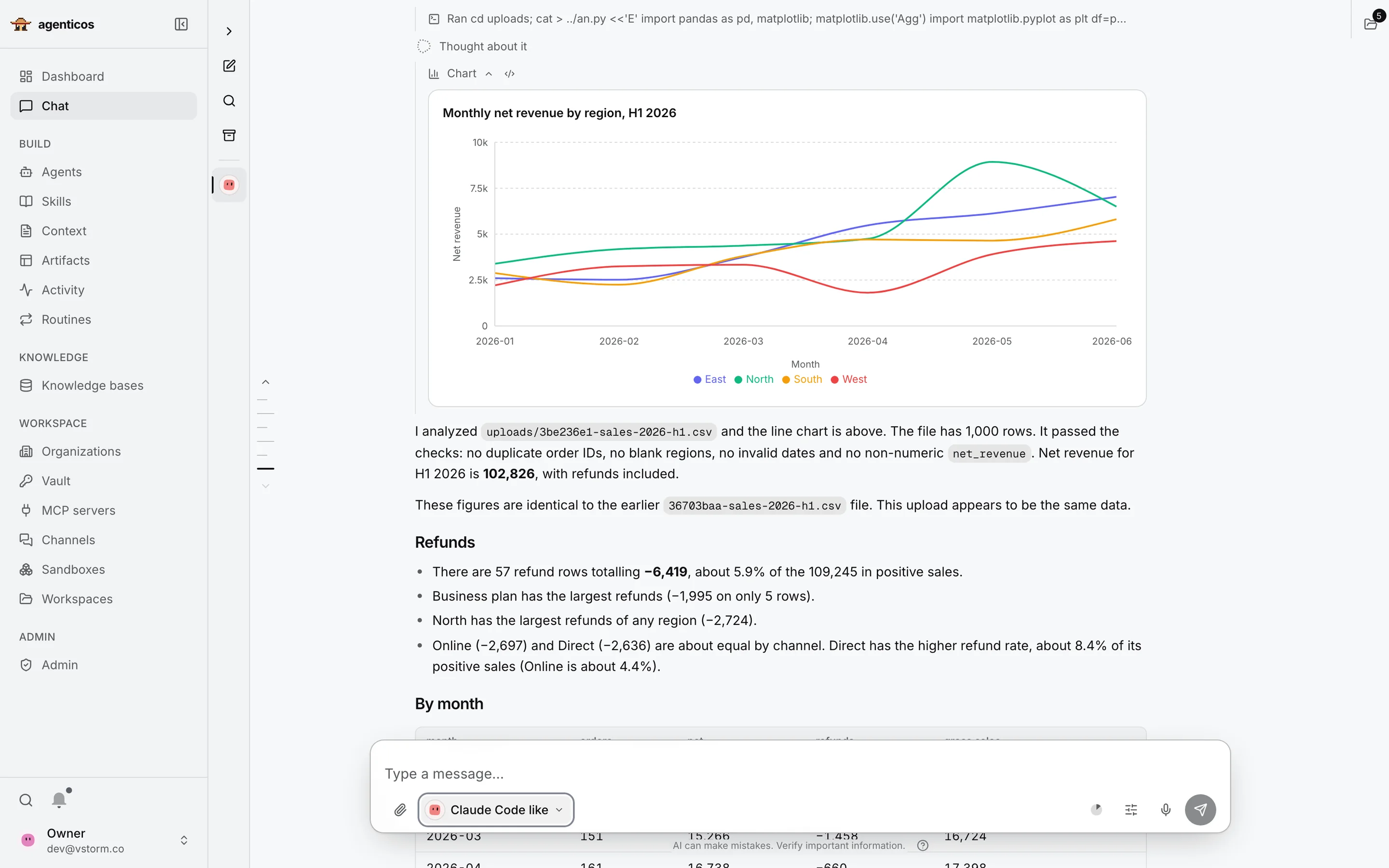
Chat answer with a monthly net revenue chart by region and the agent's written analysis of an uploaded sales CSV.
Chat · demo data

One answer, taken apart

A sales CSV was uploaded with one question: what happened in H1?

  1. The steps the agent took
  2. The chart it drew
  3. The findings, in plain text
  4. The message box, with the agent picker
1The steps

Nothing is hidden

Every command the agent ran sits above its answer. Click one to see exactly what it did.

2The chart

Drawn by code it ran

Python in a sandbox, from your file, not a picture the model imagined.

3The findings

It checks the data first

Duplicates, blank fields, invalid dates. Then totals, refunds and what stands out.

4The message box

Pick the agent, attach a file

The same chat talks to whichever agent you choose, with its own tools and knowledge.
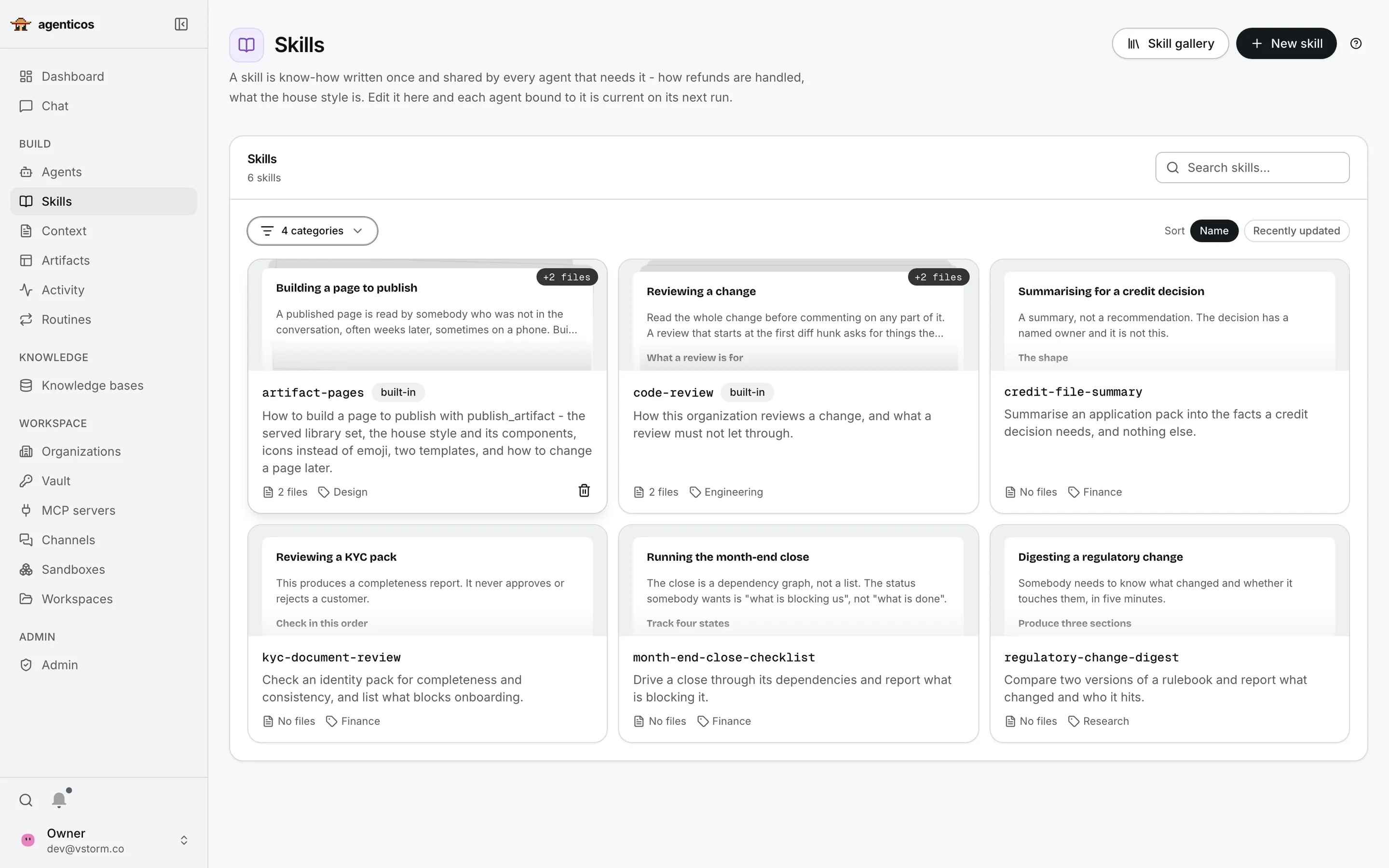
Skills library with six skills across Design, Engineering, Finance and Research.
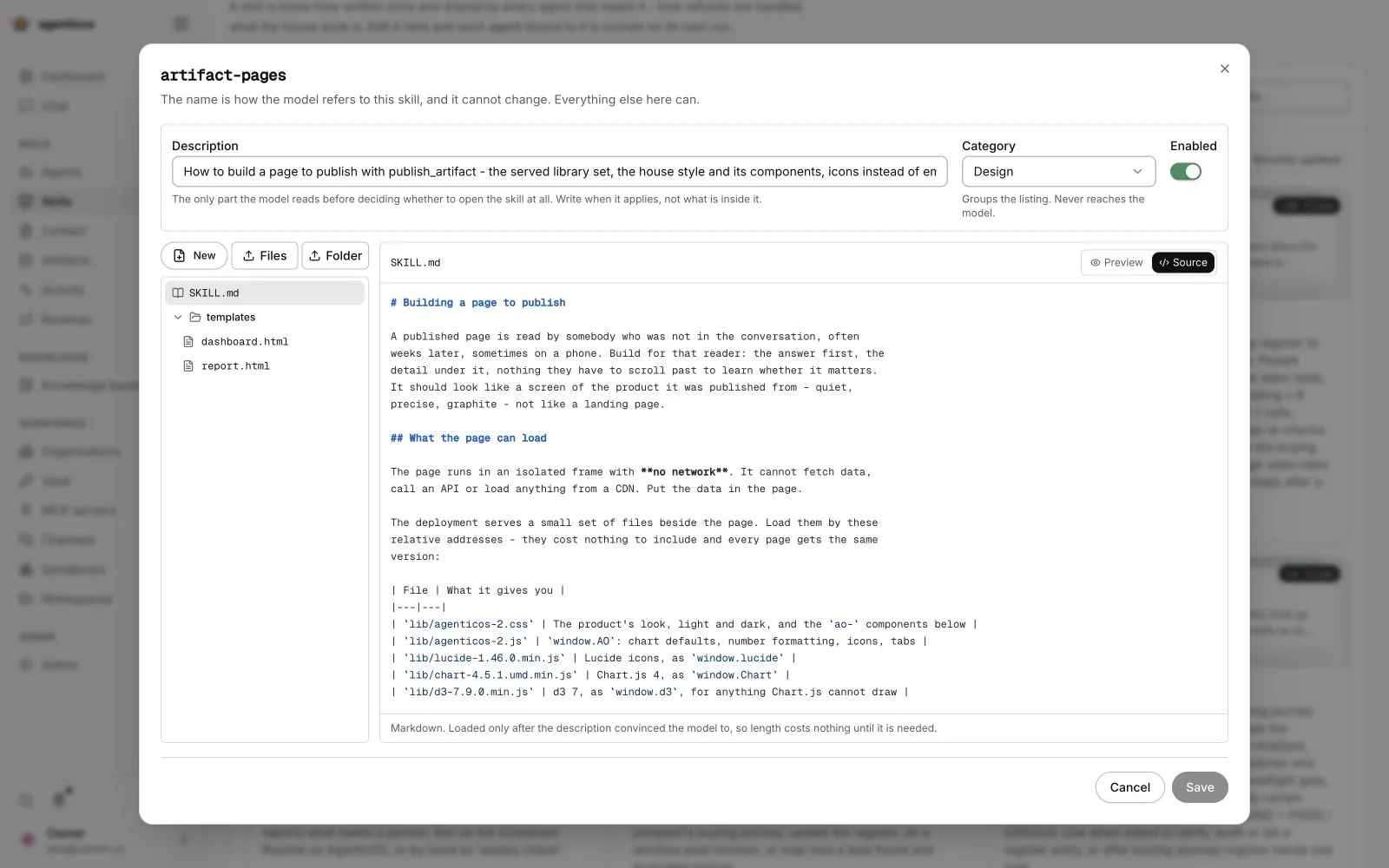
The artifact-pages skill open: description, category, files and the SKILL.md source.
Skills

Teach agents how your team works

A skill is a procedure written once: how a refund is handled, how a month-end close runs. Every agent that uses it gets the current version.

Inside one skill

Open a skill and you see three parts:

  1. Description: when the skill applies
  2. Files: templates and examples
  3. The procedure, step by step
1Description

When to use it

The one line the agent reads to decide whether this skill fits the task. The full text loads only when it does.

3The procedure

Written by your experts

Plain Markdown, edited in the browser. No code, no deployment.
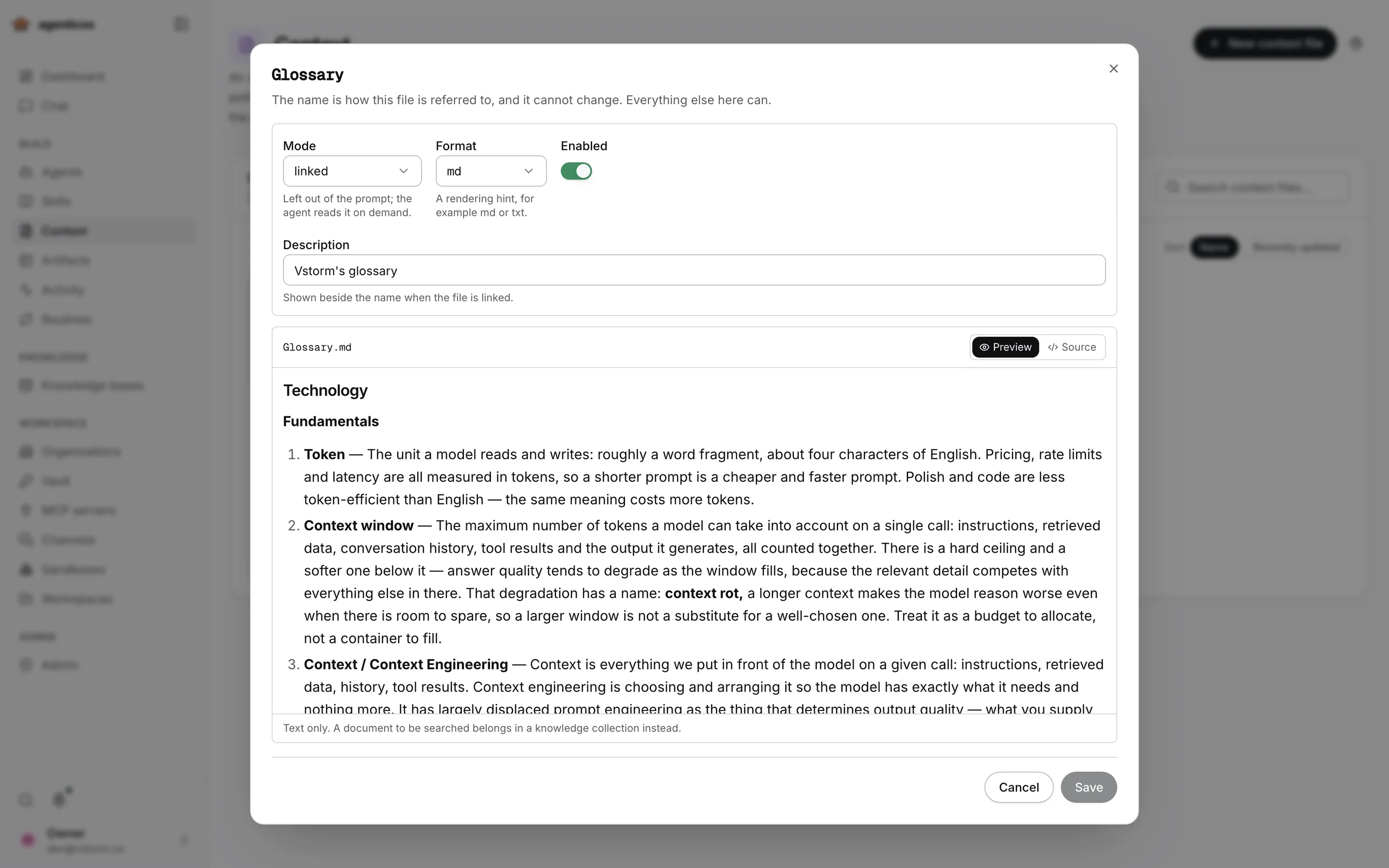
Glossary context file open in preview, linked for on-demand reading.
Context

Company knowledge, written once

A glossary, a policy or a house style that every agent can share. This one is a glossary.

  1. How it is used: always, or read on demand
  2. The content: plain text
1Mode

Always in the prompt, or on demand

Linked keeps it out of the prompt until the agent needs it, which keeps answers fast and cheap.

2Content

Your terms, your meaning

Write it once; every agent bound to it uses the same definitions.
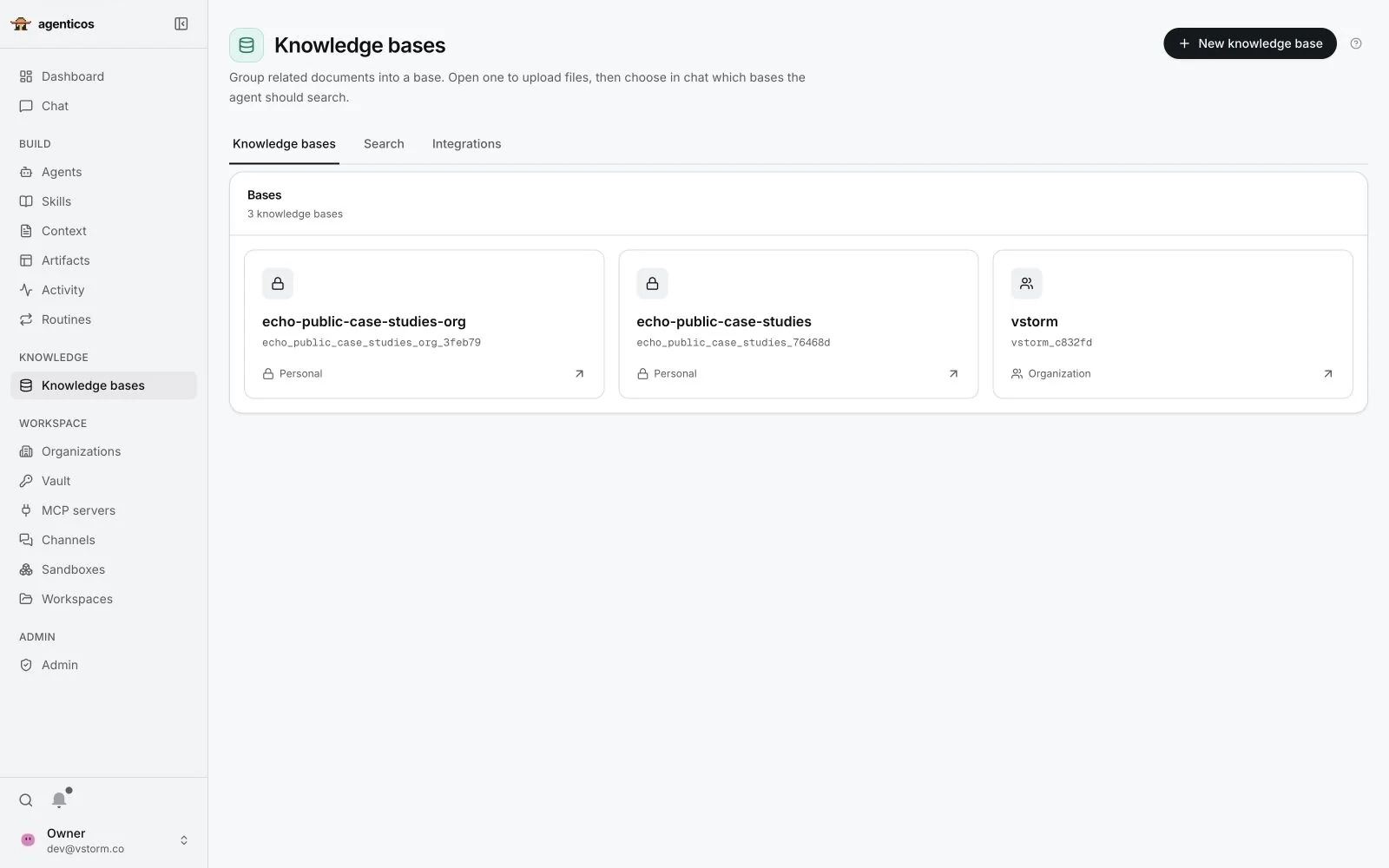
Knowledge bases page listing three bases with their visibility.
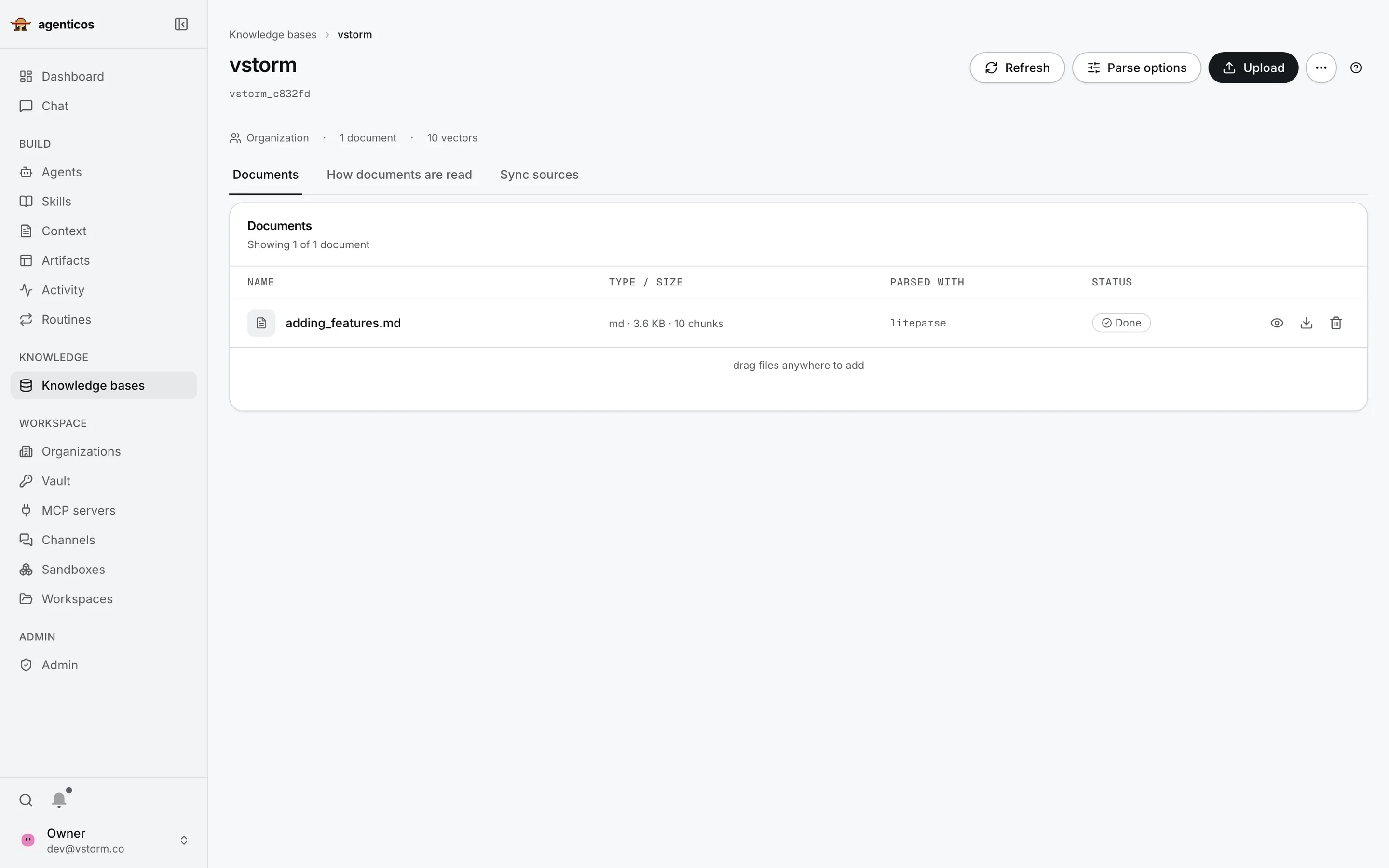
A knowledge collection with one indexed document, parsed with LiteParse, status done.
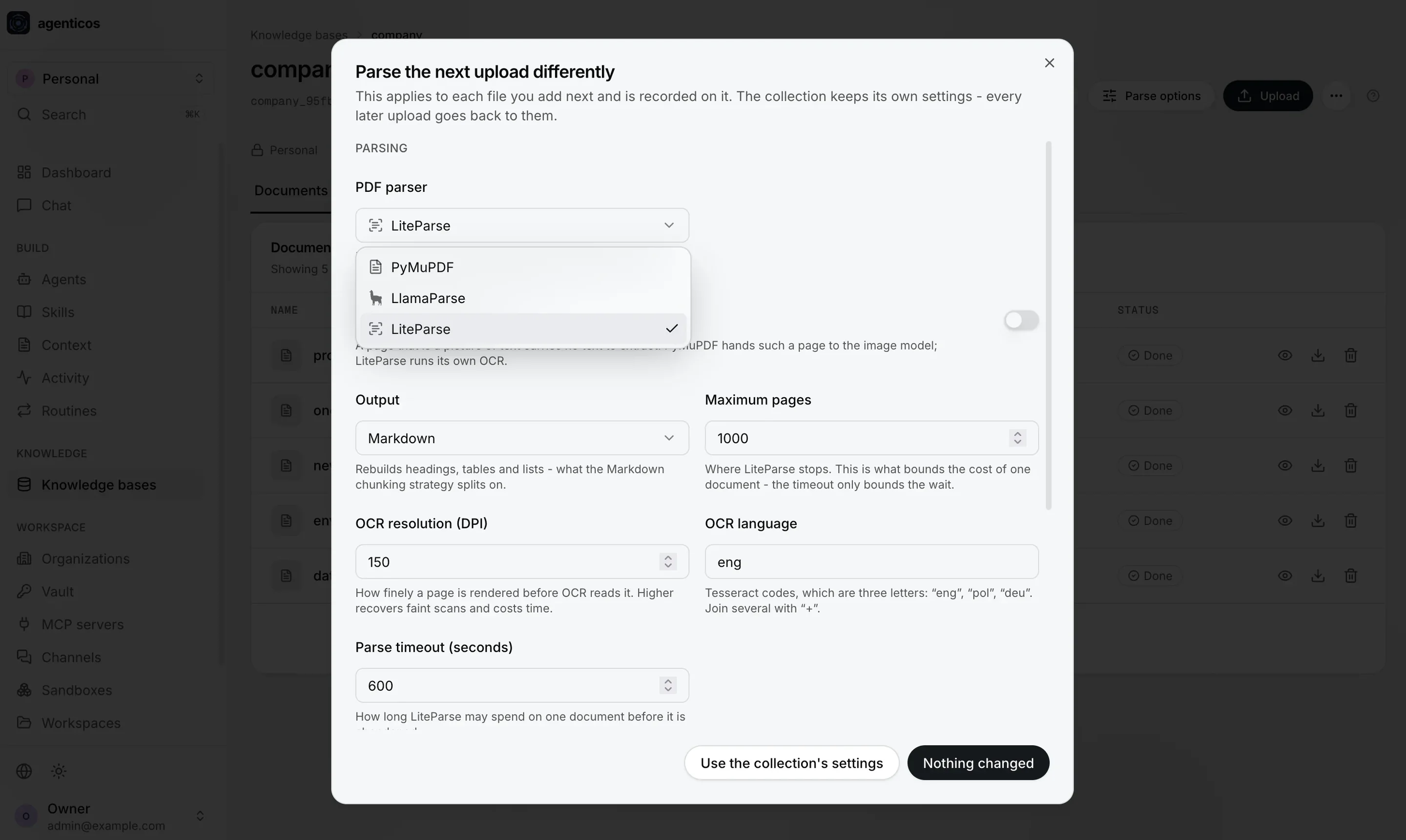
Dialog to parse the next upload differently: PDF parser choice of PyMuPDF, LlamaParse or LiteParse, output, OCR and limits.
Knowledge bases

Your documents, searchable

A knowledge base is a set of documents an agent can search. When asked, it finds the relevant passages and answers from them; this is called retrieval, or RAG.

Personal or Organization: who may use each base

Inside one base

  1. Size: documents and searchable pieces
  2. Tabs: documents, how they are read, sync sources
  3. Each document and its status
  4. Upload and parse options
3A document

See how each file was read

Type, size, how many pieces it was split into, which parser read it, and whether it is ready.

2Sync sources

Or keep it in sync

Pull documents automatically from Google Drive, S3, Git, a website, SharePoint or OneDrive.

4Parse options

Choose how a file is read

Per collection, or differently for one upload: parser, OCR for scans, output format and limits. LlamaParse is a paid cloud service; the other two run locally.
Captured from a test deployment
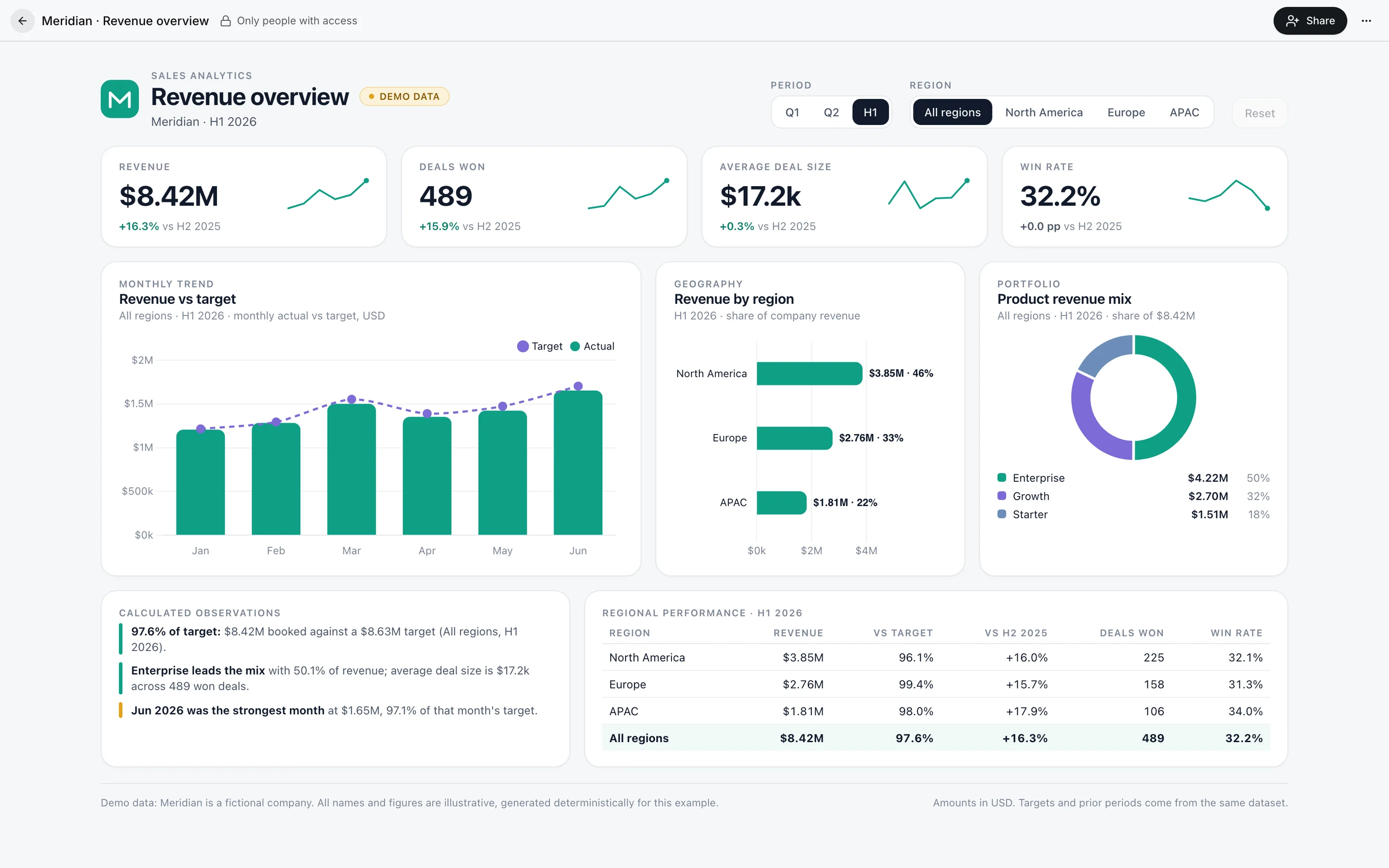
Meridian revenue overview dashboard built by an agent and marked as demo data.
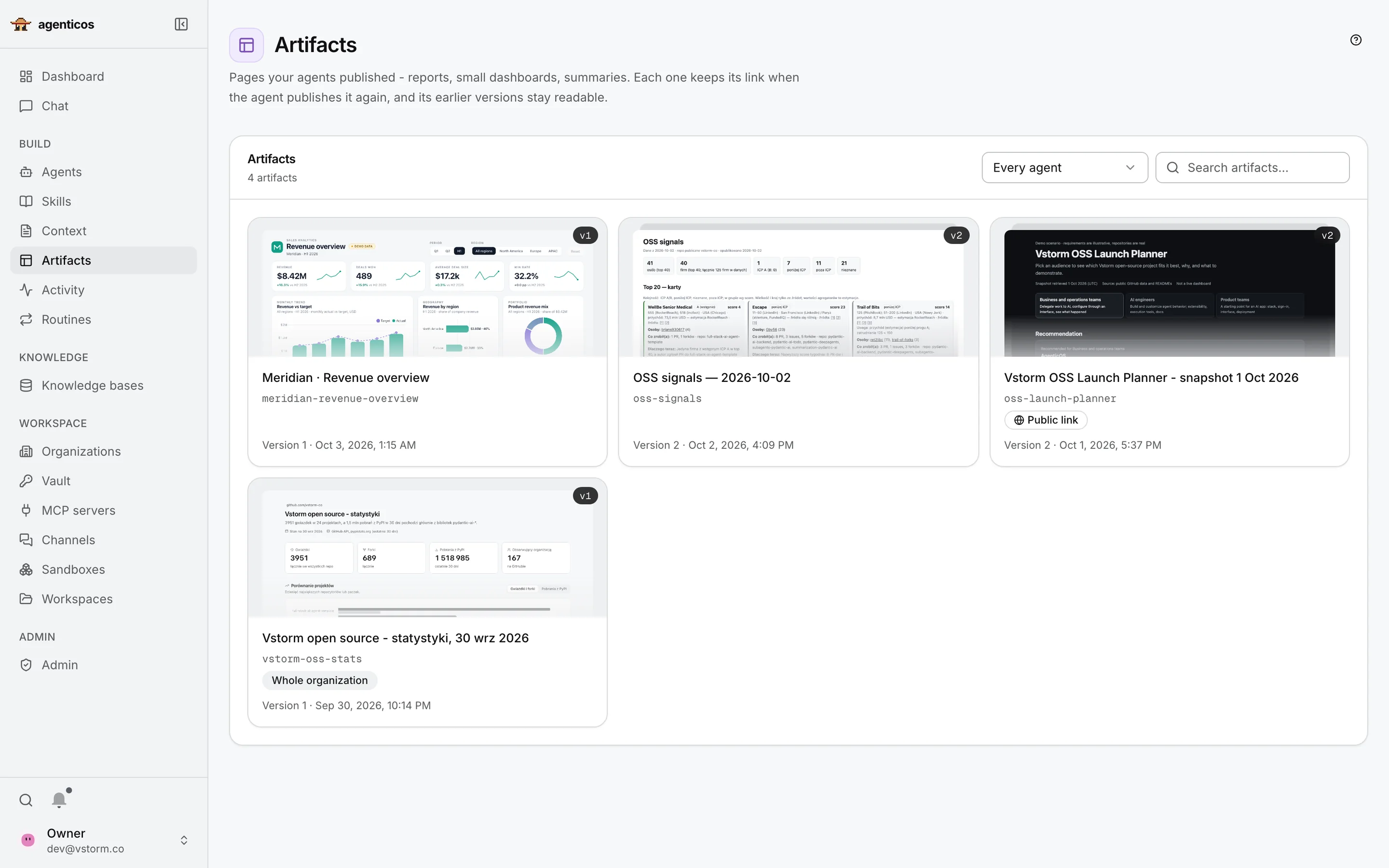
Artifacts library with four published pages, their versions and visibility.
Artifact · demo data

A page an agent built

A sales dashboard for Meridian, a fictional company. The agent wrote and published it.

  1. Sharing: who may open it
  2. Filters that work
  3. Headline numbers
  4. Charts
  5. Observations and a table
1Sharing

Only people with access

Private by default. Share it with people, a group, or a public link.

2Filters

A working page, not a screenshot

Period and region change every number on the page.

5Observations

Calculated, then explained

The text quotes numbers the page computes from the same data.

Artifacts library

Every page keeps its link

When an agent publishes an update, the link stays the same and earlier versions stay readable.
Recording · 37 s

Brief → research → shared result

One request; the agent does the rest. Follow along:

  1. the request points at a campaign brief in Notion
  2. the agent reads three repositories on GitHub
  3. it answers and publishes a page
  4. the interactive planner, with sources
  5. sharing it with a link
Real run, 1 October 2026 · press M for sound
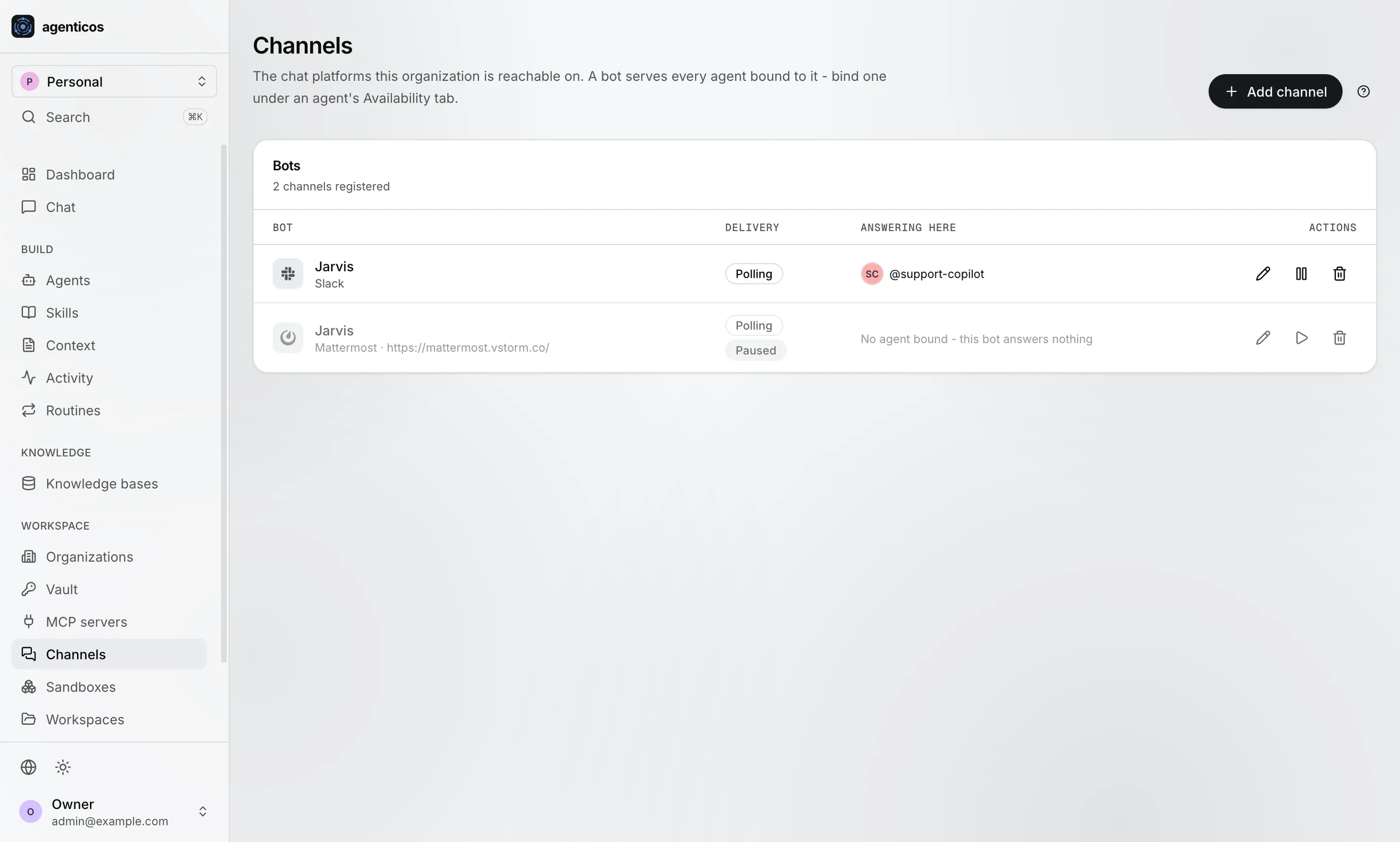
Channels page with bots registered for Slack and Mattermost.
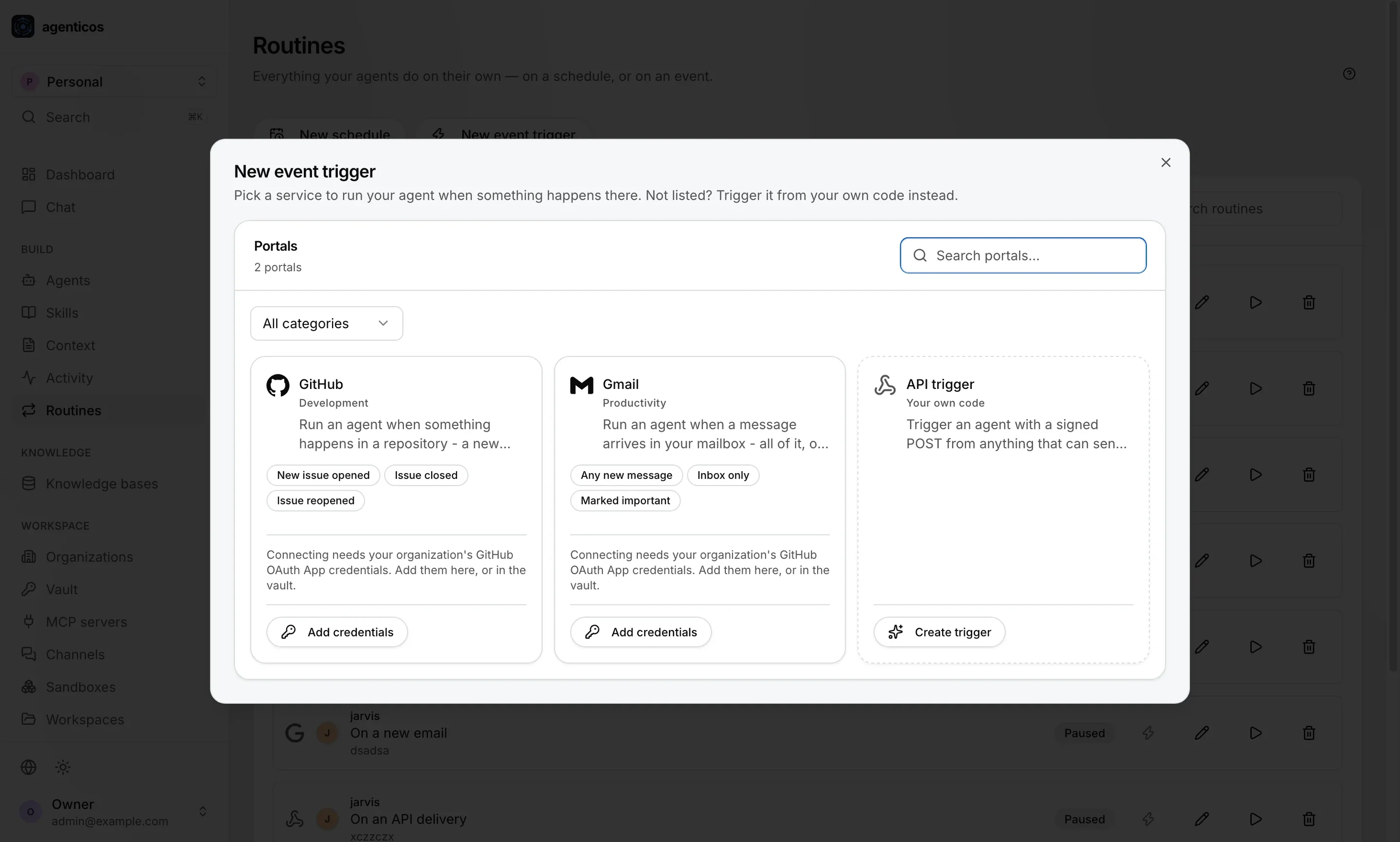
New event trigger dialog with GitHub, Gmail and API trigger options.
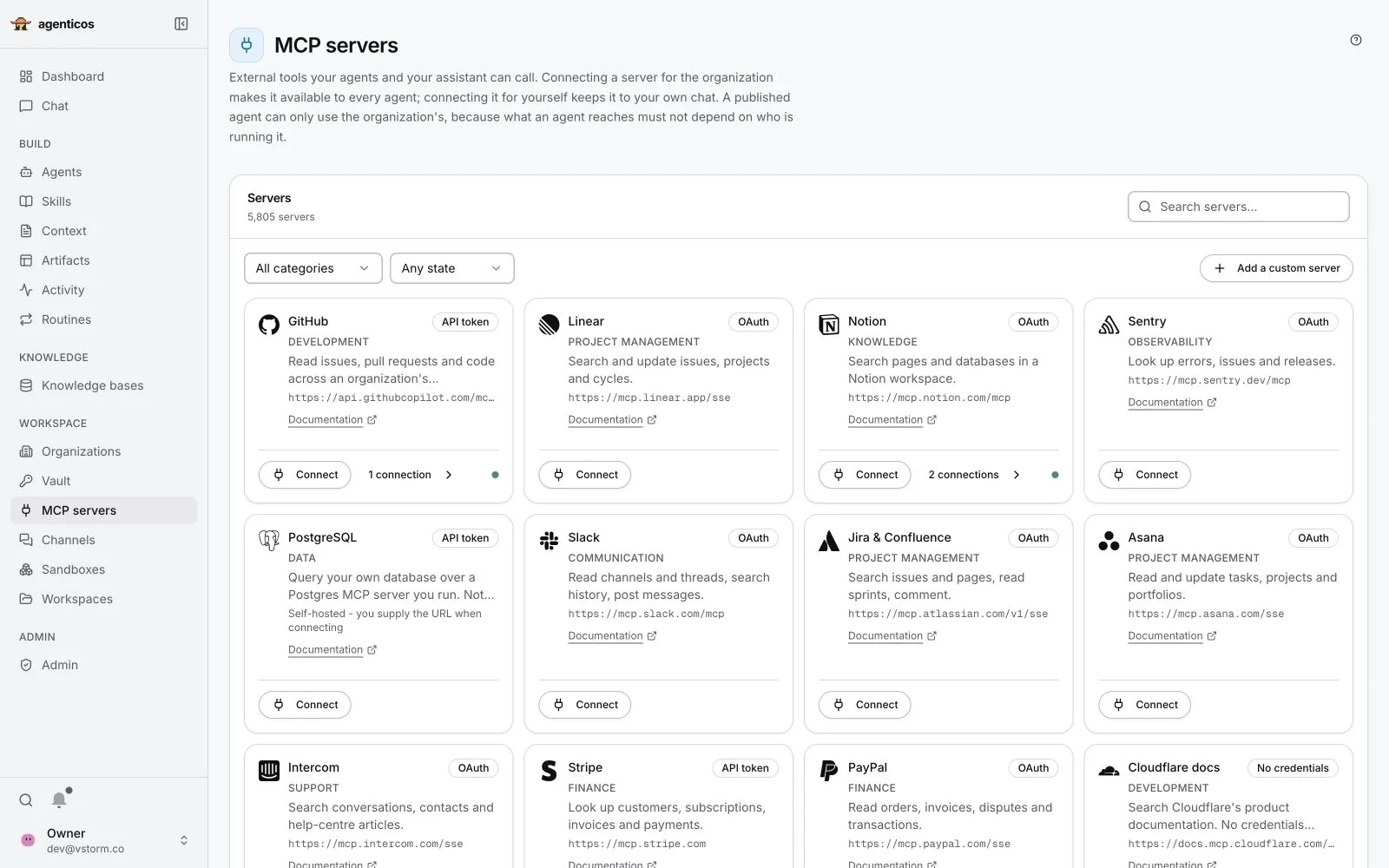
MCP servers catalogue with GitHub, Linear, Notion, Sentry, PostgreSQL, Slack, Jira and Confluence, Asana and more.
Channels

Agents in the chat tools you use

Besides web chat and the API, an agent can answer in Slack, Mattermost or Telegram.

  1. A Slack bot linked to an agent
  2. A Mattermost bot, paused
  3. Add a channel
Captured from a test deployment
Routines

Agents that start on their own

On a schedule, such as every Monday at 7:00, or when something happens:

  1. GitHub: an issue is opened or closed
  2. Gmail: a new or important message
  3. Your own system: a signed API call
MCP servers

Connect the tools you use

MCP is the open standard for plugging tools into agents. The catalogue lists curated servers and thousands from a public registry.

  1. Search the catalogue
  2. A server card: what it does and how it signs in
  3. Add your own server
2Connect

Reviewed before use

Each connection is set up with its own sign-in, and you choose which of its tools an agent may call, for example read pages but not edit them.
Publish once

Eight places one agent can answer

Web chat

In AgenticOS, for your members.

Website widget

A snippet on your site. Allowed sites only; public or signed visitors.

Hosted page

A link you can send, with its own budget, rate limit and pause switch.

API

Your systems send a task and get the answer.

WebSocket

Streamed answers, token by token, for your own front end.

Slack

Mention the bot in a channel or a thread.

Mattermost

For companies that keep chat on their own servers.

Telegram

A bot people can message directly.

The same budget, approvals and run record sit behind all eight.
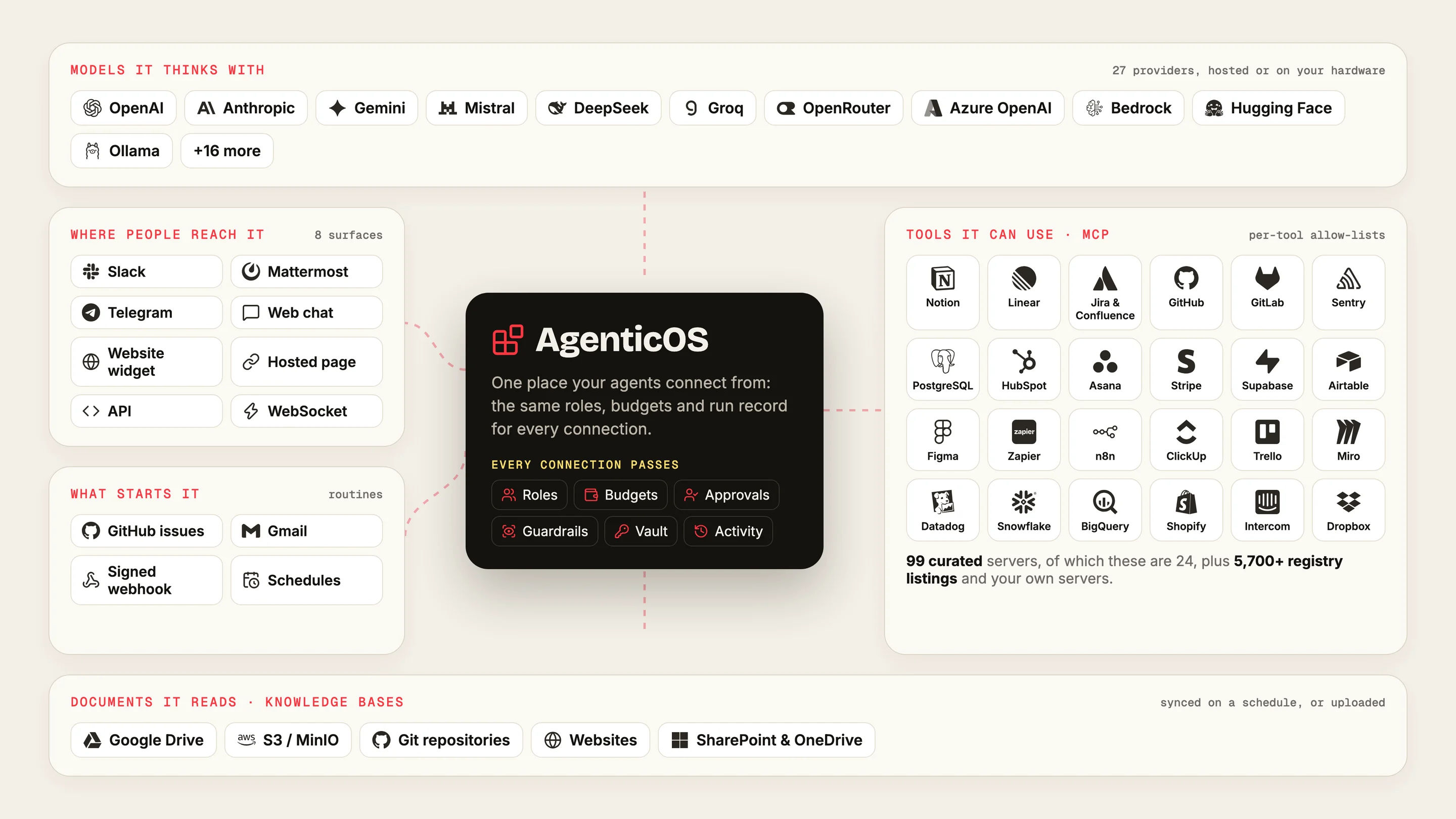
AgenticOS as a hub: the models it thinks with, where people reach it, what starts it, the tools it can use through MCP and the documents it reads.
Connections

Everything it connects to

One platform in the middle; every connection passes the same roles, budgets, approvals and record.

  1. Models it thinks with
  2. Where people reach it
  3. What starts it
  4. Tools it can use, through MCP
  5. Documents it reads
1Models

27 providers, switch per agent

Hosted providers, your Azure, Bedrock or Vertex contract, or local models through Ollama and vLLM.

4Tools

Your business apps, as tools

99 curated MCP servers and 5,700+ registry listings. You choose which of a server's tools each agent may call.

5Documents

Knowledge that stays current

Google Drive, S3, Git, websites, SharePoint and OneDrive, synced on a schedule into searchable knowledge bases.
03
Chapter 03 of 05
01
What it is
In one sentence, and what your teams do with it
02
See it work
The product screen by screen, its toolbox and a recording
03
Under control
Cost, actions, access, sign-in and security
04
For your technical team
Architecture, models, RAG, sizing, operations, limits
05
How we start
First tasks, who runs what, and the first step
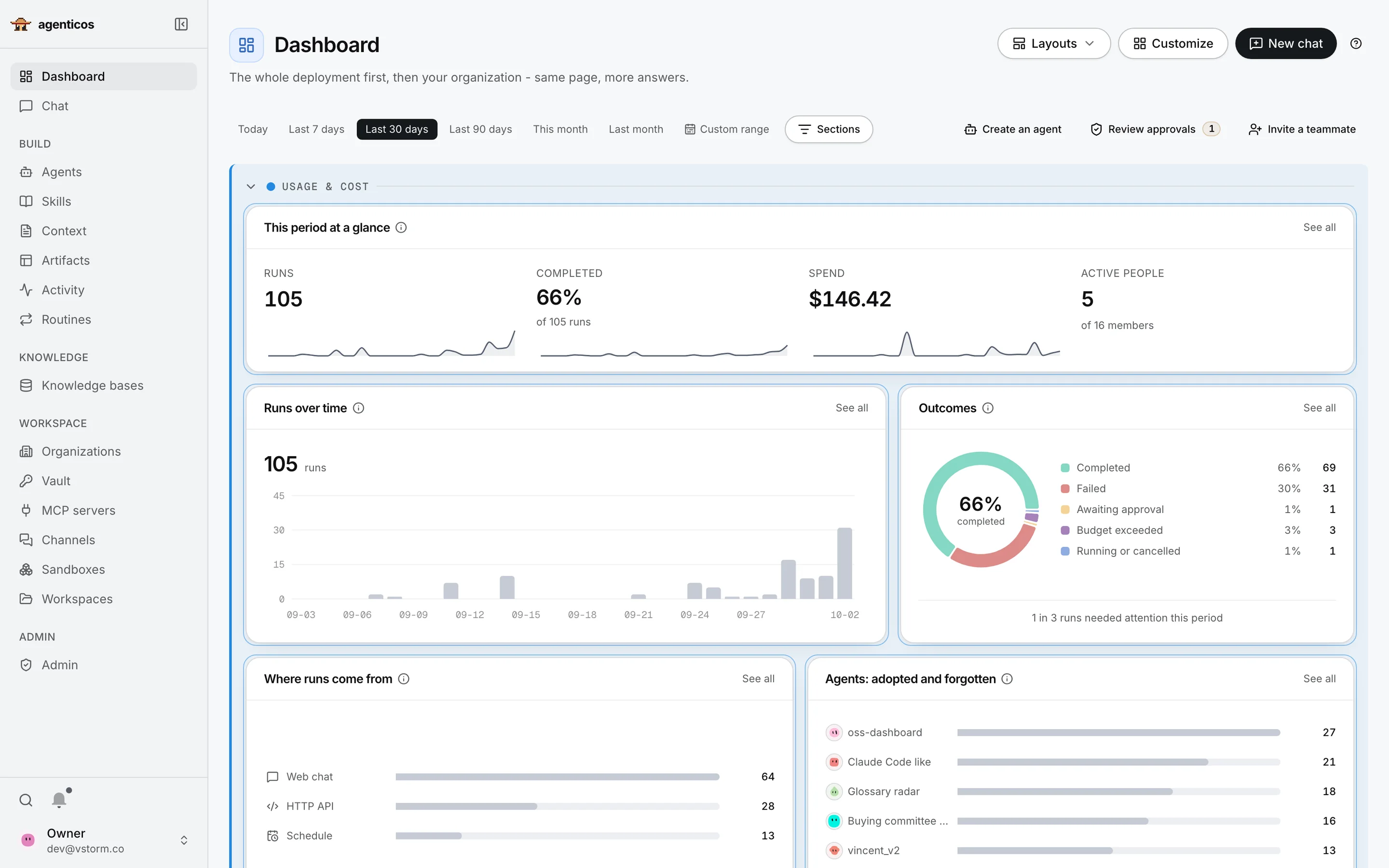
Dashboard: runs, completion, spend and active people over 30 days, runs over time, outcomes, run sources and agent usage.
Dashboard

The whole deployment on one page

What managers and administrators look at first. Six parts:

  1. Time range
  2. At a glance: runs, success, spend, people
  3. Runs over time
  4. Outcomes: what went wrong
  5. Where runs come from
  6. Which agents are used
Test deployment records, not a benchmark
2At a glance

Four numbers for the period

How many runs, how many finished, what they cost, and how many people used agents.

4Outcomes

What needs attention

Failed runs, runs waiting for a person's approval, and runs a budget stopped.

5Sources

Same agent, every entrance

Web chat, the API, schedules: all counted in the same place.

6Adoption

Adopted and forgotten

Which agents people actually use, and which nobody opens any more.
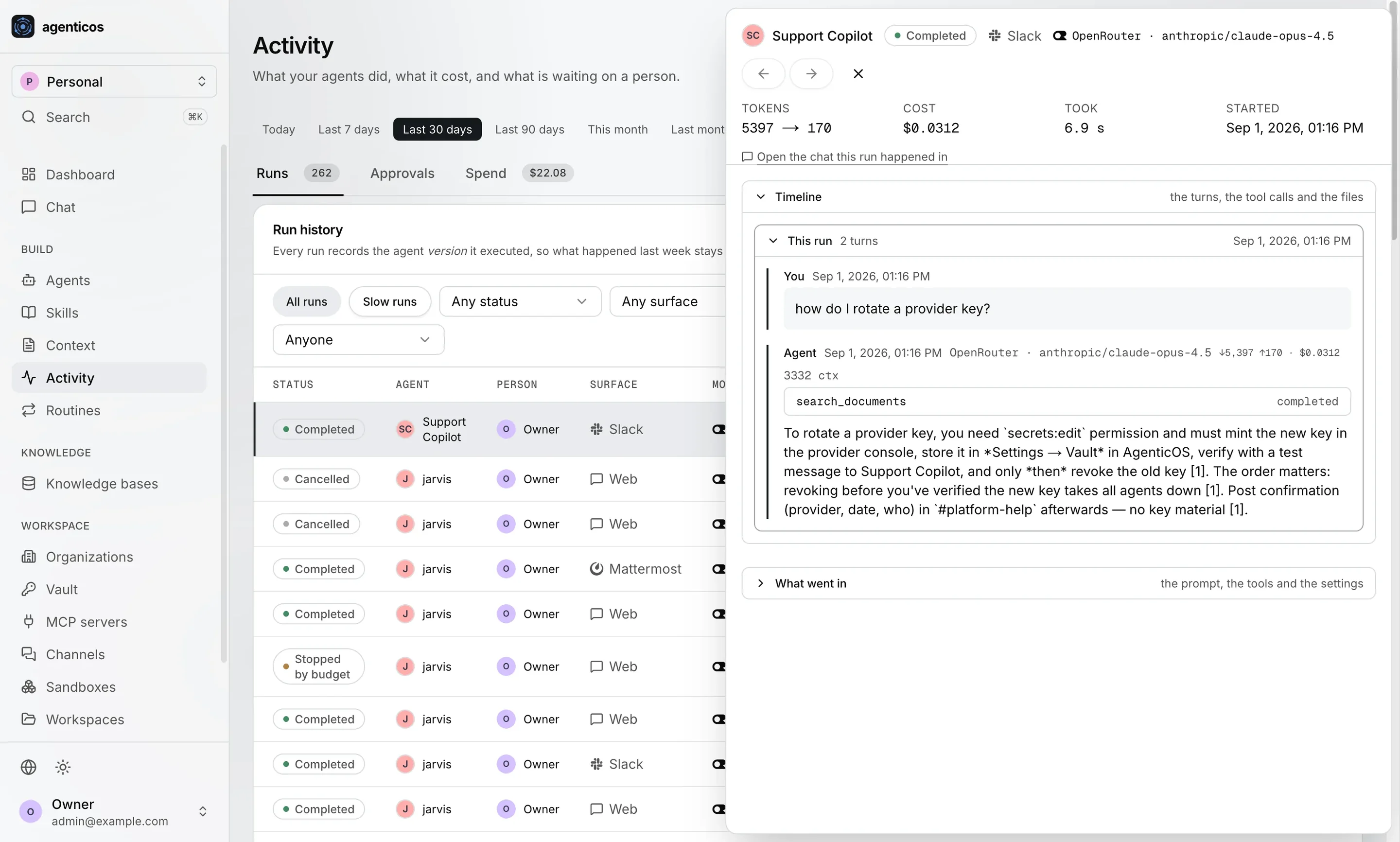
Activity run history with a run detail panel: tokens, cost, duration, the conversation and the tool call.
Activity

Every run is on the record

A “run” is one task an agent carried out. The Activity page lists all of them.

  1. Filters: status, channel, agent, person
  2. The list of runs
  3. One run, opened
Captured from a test deployment
3One run

What it did and what it cost

Tokens, cost and time; the question and the answer; the tools it called; what went into the prompt. This one came from Slack.

2Stopped by budget

A budget stops a run before it overspends

The limit is checked before each request to the model, not added up at the end of the month.
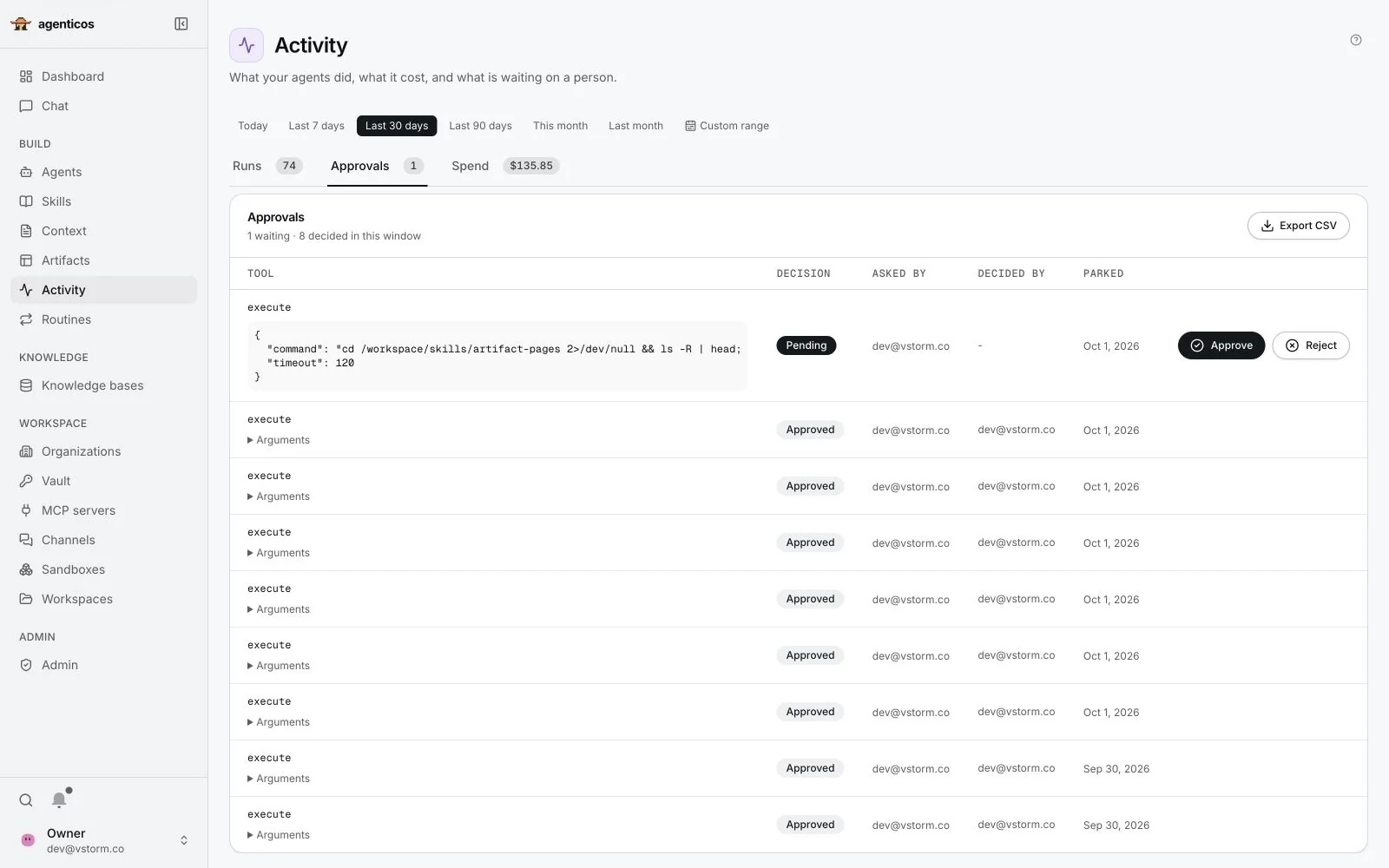
Approvals list: a pending shell command with its arguments and Approve and Reject buttons, and earlier approved calls.
Approvals

A person decides before a sensitive action runs

You choose which tools must ask first, for example running commands or sending email.

  1. Runs, approvals, spend
  2. Waiting for a decision
  3. Decided: who asked, who approved
2Waiting

The exact command, then a decision

The agent pauses. The approver reads precisely what will run and presses Approve or Reject.

3Decided

Every decision is recorded

Who asked, who decided, and when. Exportable for audit.
In summary

Four controls, all configurable

Budgets

Monthly caps per agent and organisation, checked before each model request.

Approvals

A sensitive tool waits for a person, who sees exactly what will run.

Guardrails

Hide emails, IBANs and card numbers in prompts, answers and tool results.

Activity

Every run recorded with agent version, tools, tokens and cost. Exportable.

Approval coverage depends on the tool. Guardrails are pattern-based redaction, not a certification.
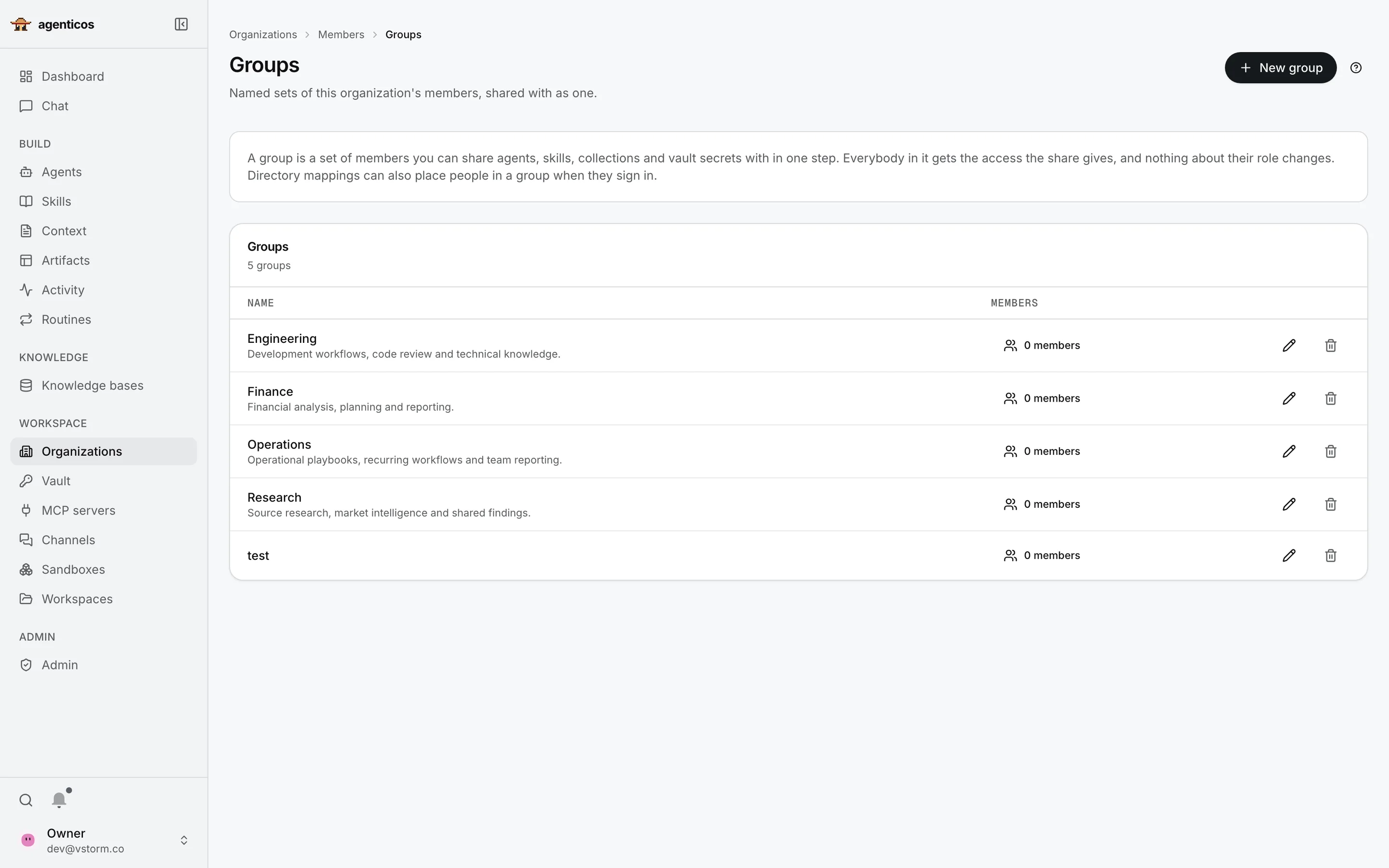
Organisation groups: Engineering, Finance, Operations and Research.
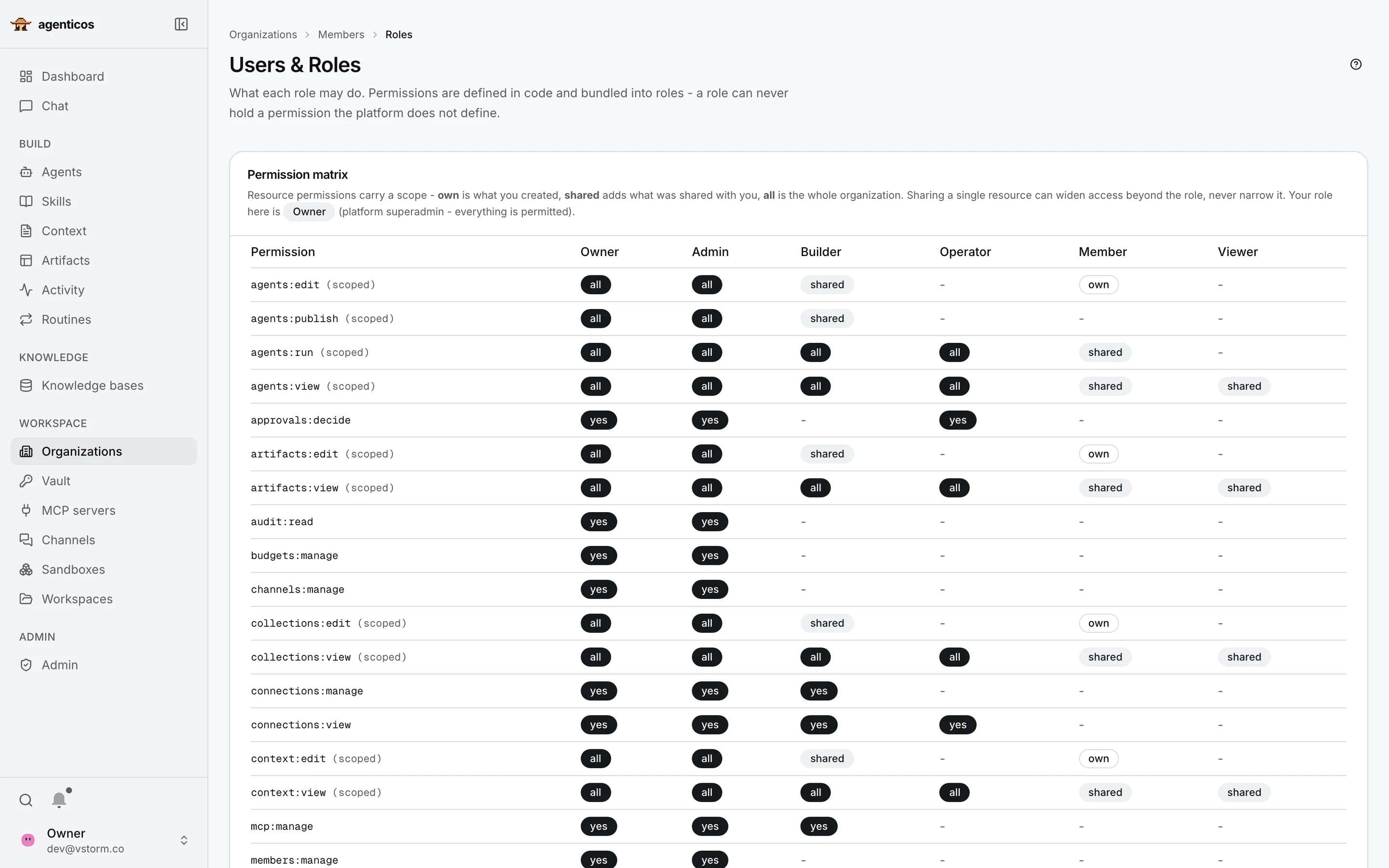
Permission matrix comparing Owner, Admin, Builder, Operator, Member and Viewer roles.
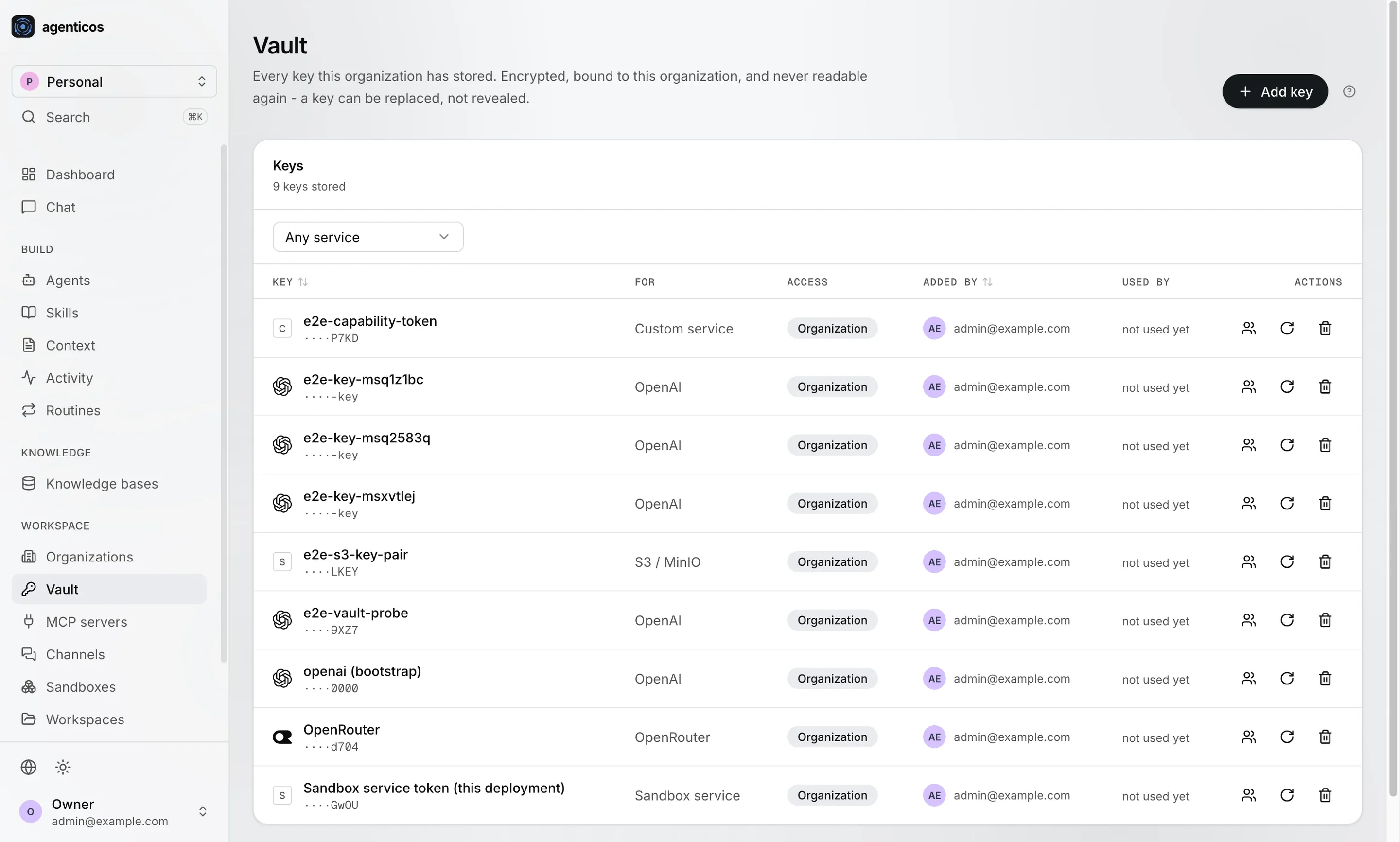
Vault listing stored keys by service, access level and who added them; values are not shown.
Groups

Departments become groups

Access follows your organisation chart.

  1. What a group is
  2. Your groups: Engineering, Finance, Operations, Research
  3. New group
2Groups

Share with a department in one step

An agent, a skill, a knowledge base or a page. A private strategy assistant can be shared with the board group only.

Company sign-in: OIDC SSO, LDAP or Kerberos
Roles

Six roles, one table

Each person has a role in the organisation.

  1. The rule: roles are defined in code
  2. What each role may do
2Permissions

Owner, Admin, Builder, Operator, Member, Viewer

all: everything in the organisation · shared: what was shared with you · own: what you created.

Vault

Every key in one vault

API keys and passwords for models and tools. Encrypted, and never shown again after saving.

  1. Keys: only the last characters are visible
  2. Access: organisation or personal
  3. Add a key
Captured from a test deployment
Organisation model

Who can do what, in three layers

Deployment platform administrator, every action audited
Organisation your company; every account also gets a personal one
Groups Finance, Operations, Board…
OwnereverythingAdminall but deleting the orgBuilderbuilds and publishes shared agents Operatorruns agents, decides approvalsMemberuses shared agents, edits ownViewerviews what is shared
Every resource

Agents, skills, context, knowledge bases, artifacts

private team organisation

plus grants to people or groups:

read use edit
Access = the wider of role and grant. A grant only adds; it never takes away. Roles are defined in code, so nobody can invent a permission.
Workspaces in the sidebar are the scratch files an agent keeps for a conversation, deleted with it.
Sign-in

Use the accounts you already have

Email and password

Plus magic links and password reset.

Google

Sign in with a Google account.

Single sign-on (OIDC)

Entra ID, Okta, Keycloak, Auth0, Authentik, Google Workspace.

LDAP

Active Directory, OpenLDAP, FreeIPA.

Windows sign-in

Kerberos: a domain-joined browser signs in by itself. Add-on image.

Directory mappings

A directory group becomes a role and a group, applied at every sign-in.

Sign-up can be open, invite-only or closed, limited to your domains. Multi-factor comes from your identity provider; no SAML or SCIM yet.
Security

Defence in layers

Vault

Every secret has its own key, wrapped per organisation and key version. Keys rotate; values are never shown again.

Sandboxes

The API never holds the Docker socket. No network unless needed; CPU, process and time limits; gVisor optional.

Artifacts

Published pages run sandboxed with no network access and a strict content security policy.

Audit log

Hash-chained per organisation, verifiable and exportable. Kept at least six years.

Sessions and traffic

Short-lived tokens, revocable sessions, “sign out everywhere”, rate limits on sign-in, API and embeds.

Data hygiene

Guardrails, emails and tokens redacted in logs, retention sweeps per data class.

Stays with your IT: disk encryption, a firewall for sandbox traffic, and backups that include the vault key.
Data sovereignty

Decide how much stays in your house

Self-hosted platform, hosted models

  • AgenticOS, documents, vectors and logs on your servers
  • Models from a provider, under your own contract and keys
  • Switch the model per agent when the market moves

Fully local

  • The same platform on your hardware
  • Open models through Ollama or vLLM
  • Local parsers and tools keep data flows inside
Self-hosting the console does not make every model or tool local. We map each destination with your security team.
04
Chapter 04 of 05
01
What it is
In one sentence, and what your teams do with it
02
See it work
The product screen by screen, its toolbox and a recording
03
Under control
Cost, actions, access, sign-in and security
04
For your technical team
Architecture, models, RAG, sizing, operations, limits
05
How we start
First tasks, who runs what, and the first step
Architecture

How it fits into your company

Your company · your infrastructure
People and systems
Financein web chat
Operationsin Slack
Boarda private agent
Your systemsCRM, ERP, intranet · API
Eventsemail, GitHub, schedules
AgenticOS
Example agents
Invoice checker Support triage Strategy · board only Monday report
Every request passes
Roles Budgets Approvals Guardrails Activity
Your data
PostgreSQL + pgvector: documents and history
Sandboxes
Containers on your hosts
Vault
Keys, envelope-encrypted
Local models
Optional: Ollama, vLLM
Outside, by choice
Hosted models
Providers under your own contract and keys
SaaS tools
Through MCP: Notion, GitHub, Linear and more
Document sources
Synced from Google Drive, SharePoint, S3
You choose every destination.
Models

27 providers, or your own

OpenAIAnthropicGoogle GeminiOpenRouterMistralDeepSeekxAICohere GroqCerebrasTogetherFireworksHugging FaceGitHub ModelsAlibabaMoonshot Z.AINebiusOVHcloudSambaNovaHerokuVercel AI Gateway Azure OpenAIAWS BedrockGoogle Vertex AI OllamaLiteLLMvLLM, LM Studio · OpenAI-compatible
hostedyour cloud contracton your hardware

Model profiles

Provider, model and key saved once per organisation, with a fallback if the first fails.

Prompt caching

On by default for Anthropic and OpenRouter, which cuts the cost of long instructions.

Embeddings

OpenAI, OpenRouter, or local models through Ollama for document search.

Knowledge bases, under the hood

From a file to a cited answer

1

Sources

Upload txt, md, docx, pdf, office files, images, or sync:

  • Google Drive
  • S3 / MinIO
  • Websites
  • Git
  • SharePoint, OneDrive
on a schedule, full or changes only
2

Read

Three parsers:

  • PyMuPDF · local
  • LiteParse · local, OCR
  • LlamaParse · cloud, key
per collection or per upload
3

Split

Recursive, Markdown-aware or fixed chunks; size and overlap per collection.

4

Embed

OpenAI, OpenRouter or local Ollama models; stored in PostgreSQL with pgvector.

5

Answer

Vector search with filters, optional query expansion and wider context, and citations.

Planned sources: Confluence, Azure Blob, Google Cloud Storage. No reranker yet.
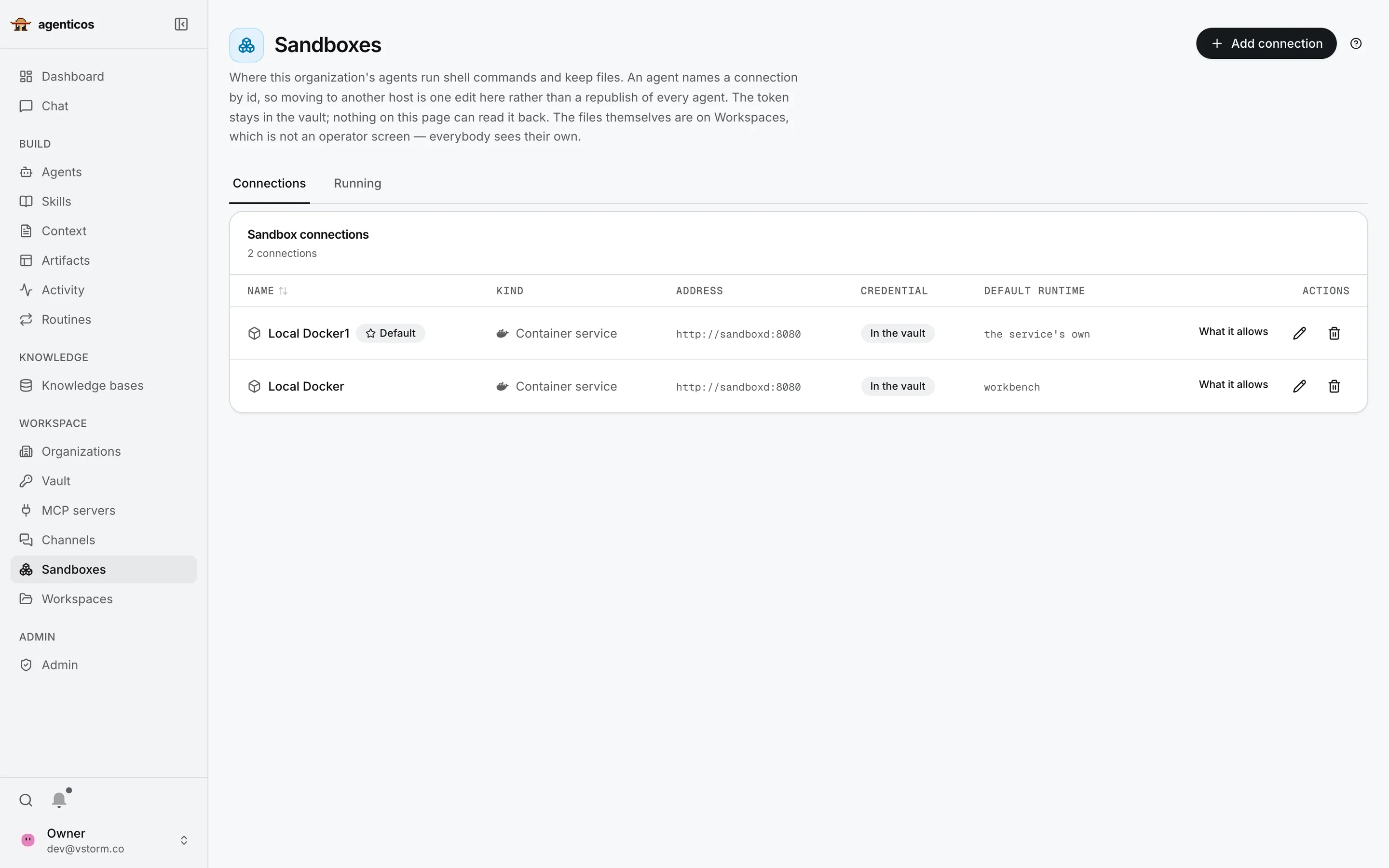
Sandbox connections: two local container services with credentials in the vault and default runtimes.
Sandboxes

Where agents run code

Code the agent writes runs in containers, never in the platform itself.

  1. How it works, in one paragraph
  2. Connections to container hosts
2Connections

Containers you control

On your own hosts or a supported remote backend. The access token stays in the vault, and the API never holds the Docker socket.

Performance and sizing

Sized for a team, measured honestly

4 vCPU · 8 GBa host that runs it
2 workerssuit a team of ten
5background runs at once by default, configurable
~1 GBAPI memory at idle with two workers
StreamingAnswers stream token by token over WebSocket, in chat and embeds.
Load testedThe database connection pool, not CPU, is the limit: raising it cut failures from 1,537 to 13 of 4,740 requests (one laptop, stub model).
TopologyOne host with Docker Compose behind a reverse proxy. No Kubernetes manifests or multi-host scaling yet.
Operations

One command to install, versioned upgrades

Install

One script checks prerequisites, asks for a model key and starts a working agent. Windows through WSL2.

Upgrade

Pin a version; database migrations run on start. Not zero-downtime.

Back up

PostgreSQL, the media volume and the settings file that holds the vault key.

Environments

Dev, staging and production point at published versions. Promote or roll back; export agents as YAML.

Observe

Built-in run history and dashboards, Logfire tracing, user ratings, CSV exports.

Languages

Console in English, Polish and German. Documentation in English, Polish, German and Spanish.

Where it stops today

What we will not claim for it

Source permissionsSharePoint ACLs are not mirrored per user. Scope the credential, share the collection.
Microsoft 365 triggersNo built-in Outlook trigger. Outlook connects through a third-party MCP service.
Visual workflow builderIn development. A plan, not a feature you can use today.
MFA, SAML, SCIMMulti-factor through your identity provider; SAML only via a bridge such as Keycloak; no SCIM.
Search quality toolsVector search with options; no reranker yet.
Scale-outSingle host today; no Kubernetes manifests, no proven 1,000-user setup.
Budgets under loadParallel runs can overshoot a cap slightly; a single queue makes it strict.
ResultsDepend on the model, tools and instructions, so we measure them on your task.
05
Chapter 05 of 05
01
What it is
In one sentence, and what your teams do with it
02
See it work
The product screen by screen, its toolbox and a recording
03
Under control
Cost, actions, access, sign-in and security
04
For your technical team
Architecture, models, RAG, sizing, operations, limits
05
How we start
First tasks, who runs what, and the first step
Choose a first task

29 tutorials, each with a check you can run

Documents

  • Your first document agent
  • Library answers with citations
  • Contract against your checklist
  • Invoice PDFs into a spreadsheet
  • Meeting transcript to decisions
  • A wiki the agent maintains

Support

  • Support assistant on your website
  • Ticket triage from your app
  • New-hire helpdesk
  • Handbook answers in Slack
  • Inbox triage and draft replies

Research and analysis

  • Sourced research report
  • Company brief before a call
  • Watch pages for changes
  • CSV into a chart you can check
  • Excel report and slide deck
  • Questions to your database

Automation

  • Weekly report on a schedule
  • GitHub issue triage
  • A team of specialist agents
  • Call an agent from your app
  • Meeting actions into tasks, approved

Content and productivity

  • Article into posts in your voice
  • Product descriptions from a catalogue
  • Translation with your terms
  • An assistant that remembers you
  • Search and update Notion

Engineering and safety

  • Code review in a sandbox
  • Personal data kept out of prompts
reference run by the maintainers, v0.0.504, 25 September 2026not yet recorded
Each tutorial has a sample input, the setup, the exact prompt and the usual failures. Reference runs, not customer results.
How we work with you

Run it yourselves, or with us

On your own

  • Apache-2.0: install, operate and extend it without us
  • Public documentation and how-to guides
  • Contribute upstream, or keep changes private

With Vstorm

  • Deployment in your infrastructure
  • Documentation and process design
  • Custom connectors and tools your processes need
  • Maintenance and support agreed per engagement
If you run it yourselves

Six jobs someone owns

Hosting and updates

Deploy, watch capacity, review releases, plan upgrades.

IT operations

Backup and recovery

Databases, files and keys backed up, and a restore actually tested.

IT operations

Sources and behaviour

Keep documents, instructions, skills and published versions current.

Subject experts

Access and secrets

Identities, grants, provider keys and their rotation.

IT and security

Failures and approvals

Inspect runs, route incidents, name who may approve.

Team leads

External services

Review every model, parser, tool, channel and tracing destination.

Security
Total cost is models, infrastructure, external services and people's time, not only the spend AgenticOS records.
A first step

Three phases, no dates yet

Choose

One repeated task

Its documents, and the person who judges the answers.

Set up

In your environment

With the model and the access rules you choose.

Check

Against agreed measures

With your people. Then decide on the next team.

Next step

Bring one task.

We set it up with you, test it on your material, and you decide what comes next.

The task Its owner Sample documents IT and security contact
vstorm.co · github.com/vstorm-co/agenticos