
Turn a request
into tracked work.
Build AI workflow automation with AgenticOS: typed steps, agent calls, MCP tools and Virtual Tables, with run history and a result someone can inspect.
Build your first workflow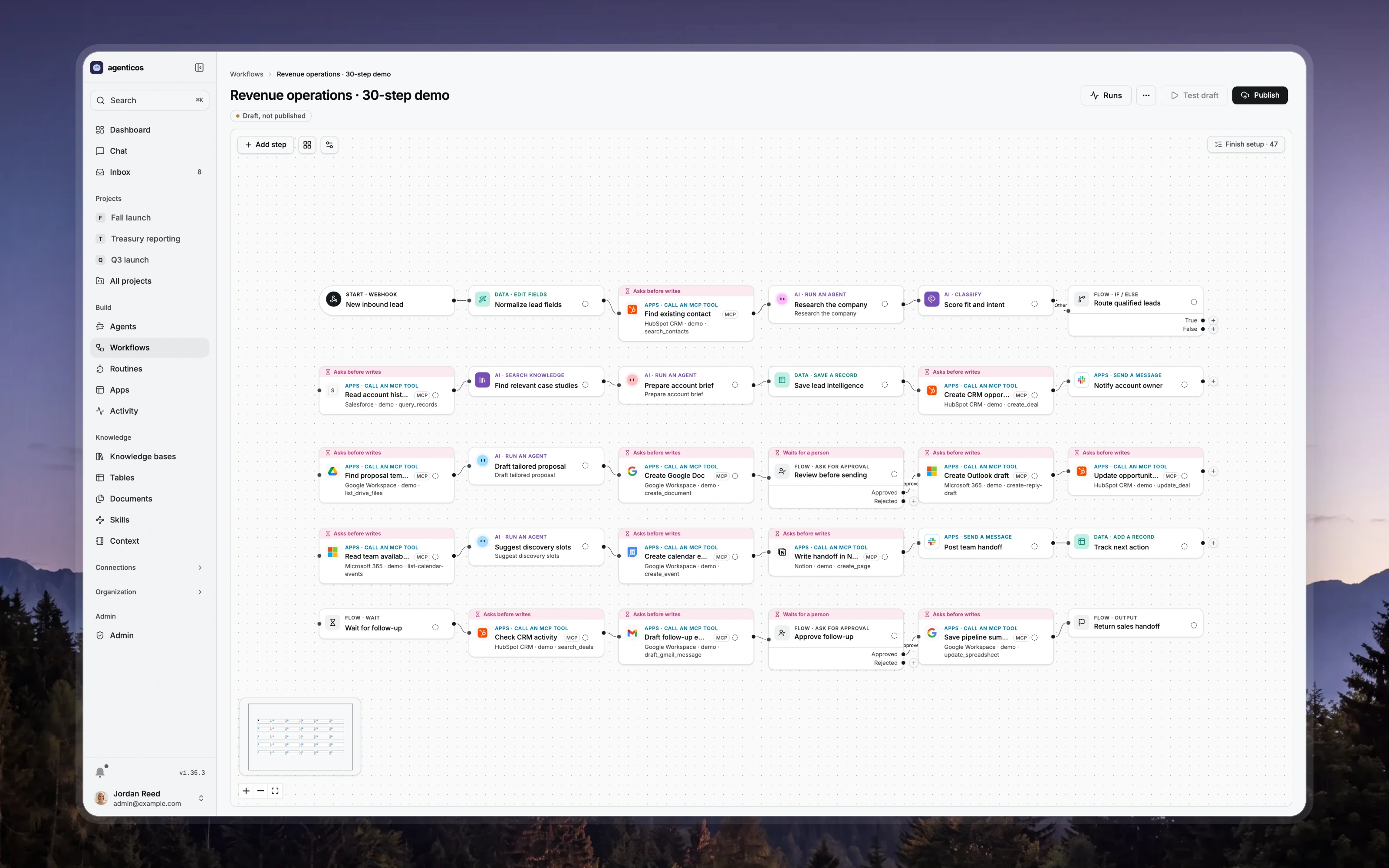
01 / Start with
A small request or record, the fields the next person needs and a defined result to store.
02 / Build toward
A published workflow version and a typed table holding results that people, agents and integrations can inspect under the same access rules.
03 / Check the result
Run the smallest configured example first. Inspect each step's output and the resulting record, then test a missing field or failed tool call before expanding it.
From example to your data
Build a version
you can inspect.
AgenticOS runs on your infrastructure. Set up the model, tools and access for this task, then use the linked documentation for the exact configuration.
- 01
Start with a runnable small template
Public API → table prepares a configured draft and its table; Markdown notebook writes a note. The API template calls the public JSONPlaceholder sample service. They are starting points for inspection, not production CRM automations.
- 02
Choose where AI belongs
Keep known transformations explicit. Add an agent call where the request needs interpretation, and define the fields the next step expects. A visually connected canvas is not sufficient: node configuration, input bindings and execution behavior still need checking.
- 03
Connect services deliberately
MCP tool steps can call configured connections. The revenue draft illustrates Microsoft, Google, HubSpot, Salesforce and Slack tasks, but importing it does not authenticate those services or establish that every connector operation works.
- 04
Store and inspect the result
Use Virtual Tables for typed records such as leads or triage results. Publish the workflow version you will run, then inspect run history and the saved record. Read and write access is enforced by the table service, including agent tools and API calls.
Questions worth
settling first.
Do I need credentials for every demo node?
You can inspect an illustrative draft without them. Executing provider operations needs configured connections and permissions. A separate six-node batch example was run locally on fictional names without models or external services; it is not the 30-step CRM draft.
Should I use a workflow or an agent?
Use explicit steps for a known sequence and an agent where interpretation or tool selection is useful. A workflow can include agent calls. Start from the required result and failure behavior, rather than making every step autonomous.
Is a Virtual Table a spreadsheet integration?
It is an AgenticOS typed record store with its own grid, views and service API. Connecting Google Sheets, Excel or a CRM is a separate integration, not something a table automatically synchronizes.